 c2cd615824
The site had drifted from the product. Every screenshot predated the
v0.5.0 UI redesign, the reading experience shipped no search and no
syntax highlighting, and a third of the pages were internal process
artefacts — migration task lists addressed to agentic workers, a
release runbook, a proposal marked "historical".

Reorganise around the only two people who read this: someone getting
the desktop app running for the first time, and someone reading the
source. Five sections replace nine — start / desktop / im / cli /
internals — and the pages that served neither reader are gone.

Site rewrite:

- Palette lifted from the desktop app's 「纸·墨·印」 themes, so the
  site and the product read as one thing. Light mirrors 纯白, dark
  mirrors 墨夜, and dark mode exists at all now.
- Fonts are self-hosted. The old @import from Google Fonts is
  unreachable from mainland China, which left every heading in a
  fallback serif; it also only requested weight 600 while the CSS
  asked for 900, so Latin and CJK in the same heading disagreed.
- Docs were shipped as one 968KB manifest downloaded on every page
  view. Split into a 32KB index plus one lazily imported chunk per
  page; the entry bundle is now 101KB gzipped.
- Add search, syntax highlighting, per-route meta with canonical and
  hreflang, a sitemap, and an error boundary. Replace the 44vh
  mobile sidebar with a drawer.
- Image dimensions are read at build time and written into the tag,
  so lazy images reserve their space instead of collapsing.

Screenshots are recaptured from a real v0.5.0 build against a clean
demo project, with tokens, QR codes and paired accounts redacted.
The previous set is deleted rather than kept alongside.

Routes follow file paths, so the restructure would have broken every
inbound link; 37 old paths redirect, in both languages. The PR policy
gate and CODEOWNERS also hardcoded docs/guide/contributing.md.

Verified: check:docs 78 pages / 323 links / 0 problems, check:policy
127 pass. Walked every route at 1440 and 390 in both themes for
overflow, contrast, keyboard reachability and focus management.
4.6 KiB
| title | nav_title | description | order |
|---|---|---|---|
| Architecture Overview | Architecture | How the five layers divide the work, how one message flows through them, and which page to read for the change you want to make. | 0 |
Architecture Overview
Claude Code Haha looks like one desktop app, but it is five pieces of code that each run on their own. Before reading source or opening a PR, get the boundaries straight — every other page in this section lives inside one of them.
desktop/src/          Frontend — React + Zustand. Draws the UI, touches no native capability.
desktop/electron/     Desktop shell — Electron main process: windows, updates, terminals, native preview.
src/server/           Local server — REST + WebSocket on Bun.serve, shared by desktop and phone.
src/                  CLI core — agent loop, tool system, permissions, memory, skills.
adapters/             IM bridges — one sidecar per platform, all wired back to the same sessions.
Three facts are worth holding onto:
- The CLI core is the only thing that executes. Every desktop session makes the server spawn a CLI subprocess; every button in the frontend eventually becomes a message sent to it.
- The local server is the only entry point. Desktop, mobile H5, and IM adapters share one REST and WebSocket surface — they differ only in how much they are trusted.
- Electron is the current desktop path.
desktop/src-tauri/keeps packaging assets and historical code as a rollback option; it is not the runtime.
How the CLI core is layered

After bootstrap, the entry layer splits in two. On the left is the path that carries one request to completion: terminal UI, query engine, tool system, subagents. On the right are the cross-cutting capabilities that path calls into: state management, skills and plugins, and the service layer holding MCP, OAuth, and memory. The desktop app replaces the terminal UI box and reuses everything else as-is.
What happens to one message
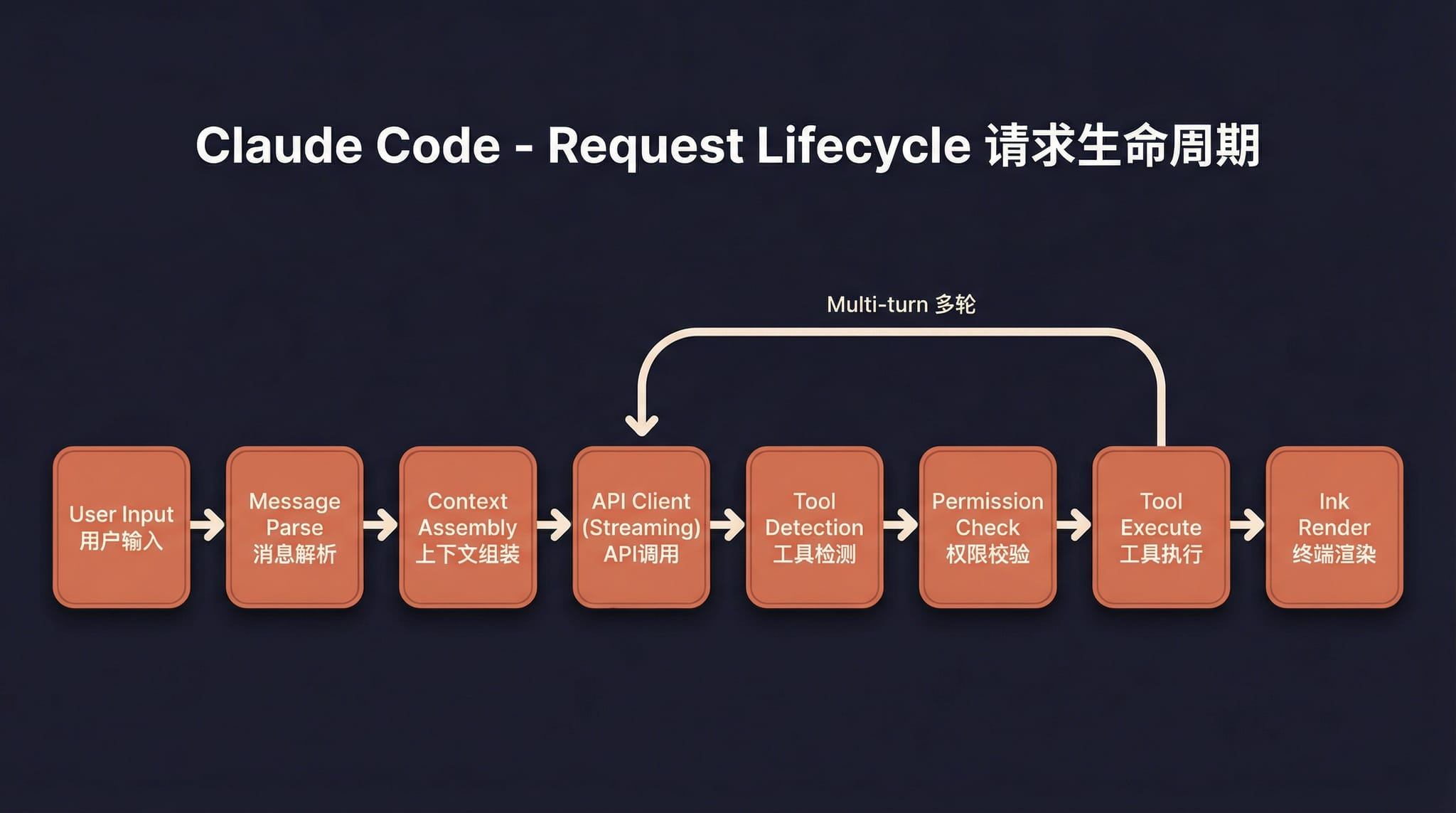
Input is parsed, context is assembled, and the request goes to the model. The moment a tool call appears in the stream, it passes a permission check before it runs; the result is folded back into the context and the next turn starts, until the model stops asking for tools. The tool cards and permission prompts you see in the desktop app are two nodes of this path, rendered.
How tools and permissions relate

Every tool registers in one registry, grouped by capability: files, shell, system, subagents, external integrations, and communication. The fixed pipeline underneath is what actually defines the safety boundary — any call passes argument validation and the permission gate before it reaches the sandbox. Adding a tool to the registry is easy; deciding which side of that gate it belongs on is the real work.
I want to change X — where do I start
| What you want to touch | Start here |
|---|---|
| Windows, tray, auto-update, embedded terminal, native preview | Desktop architecture |
| REST endpoints, WebSocket events, auth, provider proxy | Local server and API |
| You cannot find which directory a feature lives in | Project structure |
| Subagent behavior, built-in agents, Agent Teams | Multi-agent usage guide |
| Spawn paths, tool pool filtering, the background task engine | Multi-agent internals |
| The agent loop, system prompts, context compression | Agent framework deep dive |
| Writing skills, source precedence, activation | Skills usage guide |
| Skill discovery, injection, fork execution | Skills internals |
| Where memories live and when they are written | Memory system usage guide |
| Memory injection, extraction, retrieval, team sync | Memory system internals |
| Background memory consolidation | AutoDream memory consolidation |
| Screen control tools, authorization, coordinate mapping | Computer Use architecture |
| IM message protocol, access control, permission relay | Channel system |
| What to run before a PR, and the release process | Contributing and quality gates |
| Running the CLI in a terminal or from a script | CLI install and run |
Product features are covered elsewhere — start from Get started and Desktop features.