
18 KiB
Claude Code Multi-Agent System — Usage Guide
Let Claude Code orchestrate multiple specialized agents to handle complex tasks in parallel.
Multi-Agent System · Six Built-in Agents · Spawning Agents · Background Tasks · Agent Teams · Custom Agents · Permission Modes · Quick Reference

1. What Is the Multi-Agent System?
Claude Code's multi-agent system is an intelligent task orchestration framework that enables the primary agent to spawn multiple specialized subagents, each executing different tasks independently, then aggregating results for the user.
Core philosophy: Break large tasks into specialized subtasks, execute them in parallel, and boost efficiency.
| Scenario | Traditional Approach | Multi-Agent Approach |
|---|---|---|
| Research 5 module architectures | Explore them one by one | 5 Explore agents scan in parallel |
| Implement + Test + Document | Complete sequentially | Team members each handle one part |
| Code review | Single-threaded, file by file | Multiple reviewers in parallel |
| Debug a complex bug | Try one hypothesis at a time | Multiple debuggers verify in parallel |
2. Six Built-in Agents

Claude Code ships with 6 specialized agent types, each with a specific tool pool and intended use case:
2.1 general-purpose (General Agent)
Use case: Complex multi-step research, code search, tasks requiring full tool access.
Agent({
  description: "Research auth module",
  prompt: "Analyze all files under src/auth/ for the authentication flow...",
  subagent_type: "general-purpose"
})
- Tool pool: All tools (
*) - Model: Inherited from parent
- Characteristics: The all-rounder — choose this when you are unsure which agent type to use
2.2 Explore (Exploration Agent)
Use case: Quickly search files, find code patterns, answer questions about codebase structure.
Agent({
  description: "Search API endpoints",
  prompt: "Find all REST API endpoint definitions...",
  subagent_type: "Explore"
})
- Tool pool: Read-only tools (Glob, Grep, Read, Bash)
- Model: Haiku (fast, low cost)
- Characteristics: Cannot modify files; fast; ideal for research
2.3 Plan (Planning Agent)
Use case: Design implementation plans, analyze architectural trade-offs, generate step-by-step plans.
Agent({
  description: "Plan refactoring",
  prompt: "Design a plan to split the monolith into microservices...",
  subagent_type: "Plan"
})
- Tool pool: Read-only tools (same as Explore)
- Model: Inherited from parent (requires strong reasoning)
- Characteristics: Outputs structured plans including key files and dependency analysis
2.4 verification (Verification Agent)
Use case: Independently verify that an implementation is correct, run tests, perform boundary checks.
Agent({
  description: "Verify login feature",
  prompt: "Verify the newly implemented login feature works correctly...",
  subagent_type: "verification"
})
- Tool pool: Read-only tools
- Model: Inherited from parent
- Characteristics: Always runs in the background; outputs PASS/FAIL/PARTIAL verdicts; displayed with a red badge
2.5 claude-code-guide (Guide Agent)
Use case: Answer questions about Claude Code, Agent SDK, or the Claude API.
Agent({
  description: "Query Claude API usage",
  prompt: "How do I use the tool_use feature...",
  subagent_type: "claude-code-guide"
})
- Tool pool: Bash, Read, WebFetch, WebSearch
- Model: Haiku
- Characteristics: Focused on documentation queries; uses the dontAsk permission mode
2.6 statusline-setup (Status Bar Configuration Agent)
Use case: Configure the Claude Code status bar display.
- Tool pool: Read + Edit only
- Model: Sonnet
- Characteristics: Highly specialized with an extremely narrow scope
Agent Type Comparison
| Agent | Access | Tool Pool | Model | Purpose |
|---|---|---|---|---|
| general-purpose | Read/Write | All | Inherited | General tasks |
| Explore | Read-only | Search + Read | Haiku | Quick exploration |
| Plan | Read-only | Search + Read | Inherited | Architecture planning |
| verification | Read-only | Search + Read | Inherited | Independent verification |
| claude-code-guide | Read-only | Search + Web | Haiku | Documentation guide |
| statusline-setup | Read/Write | Read + Edit | Sonnet | Status bar config |
3. How to Spawn Agents
Parameters
The Agent tool accepts the following parameters:
| Parameter | Type | Required | Description |
|---|---|---|---|
description |
string | Yes | 3-5 word task summary |
prompt |
string | Yes | Full task description |
subagent_type |
string | No | Agent type (see table above) |
model |
string | No | Model override: sonnet/opus/haiku |
run_in_background |
boolean | No | Whether to run in background |
name |
string | No | Name the agent so it can be addressed via SendMessage |
team_name |
string | No | Join a specified team |
mode |
string | No | Permission mode |
isolation |
string | No | Isolation mode: worktree |
Foreground Synchronous Execution (Default)
The simplest usage — the agent completes and returns its result:
Agent({
  description: "Analyze error logs",
  prompt: "Read the latest error logs under logs/ and summarize common error patterns"
})
The primary agent waits for the subagent to finish, then receives the result and continues working.
Background Asynchronous Execution
Suitable for time-consuming tasks where the primary agent can continue with other work:
Agent({
  description: "Full code review",
  prompt: "Review all TypeScript files under src/ for code quality...",
  run_in_background: true
})
- The agent immediately returns an
async_launchedstatus with a taskId - The primary agent continues working without waiting
- When the agent completes, a
<task-notification>is delivered automatically - The notification includes task status, output file path, and a result summary
Spawning Multiple Agents in Parallel
Spawn multiple independent agents in a single message for true parallelism:
// Launch 3 explore agents simultaneously
Agent({ description: "Explore frontend", prompt: "...", subagent_type: "Explore", run_in_background: true })
Agent({ description: "Explore backend", prompt: "...", subagent_type: "Explore", run_in_background: true })
Agent({ description: "Explore database", prompt: "...", subagent_type: "Explore", run_in_background: true })
Worktree Isolation
Let an agent work in an isolated git worktree without affecting the main workspace:
Agent({
  description: "Experimental refactor",
  prompt: "Try refactoring module X into...",
  isolation: "worktree"
})
- Automatically creates a git worktree (on an independent branch)
- The agent can freely modify files in the isolated environment
- If changes were made, returns the worktree path and branch name on completion
- If no changes were made, cleans up automatically
4. Background Task Management

Task States
Background agents have four possible states:
| State | Description |
|---|---|
running |
Currently executing |
completed |
Finished successfully |
failed |
Execution failed |
killed |
Manually terminated |
Progress Tracking
Background agent progress updates in real time:
- Token usage: Input/output token counts
- Tool usage: Number of tools invoked
- Recent activity: Descriptions of the last 5 tool calls (circular buffer)
- Last activity time: Used to detect stuck tasks
Completion Notifications
When a background agent finishes, the primary agent receives an XML-formatted notification:
<task-notification>
  <task-id>abc123</task-id>
  <status>completed</status>
  <summary>Agent "Explore frontend" completed</summary>
  <output-file>~/.claude/temp/.../tasks/abc123.output</output-file>
</task-notification>
Automatic Backgrounding
When the tengu_auto_background_agents feature flag is enabled, foreground agents that run for more than 120 seconds are automatically moved to background execution, freeing the primary agent to continue working.
5. Agent Teams — Multi-Agent Collaboration
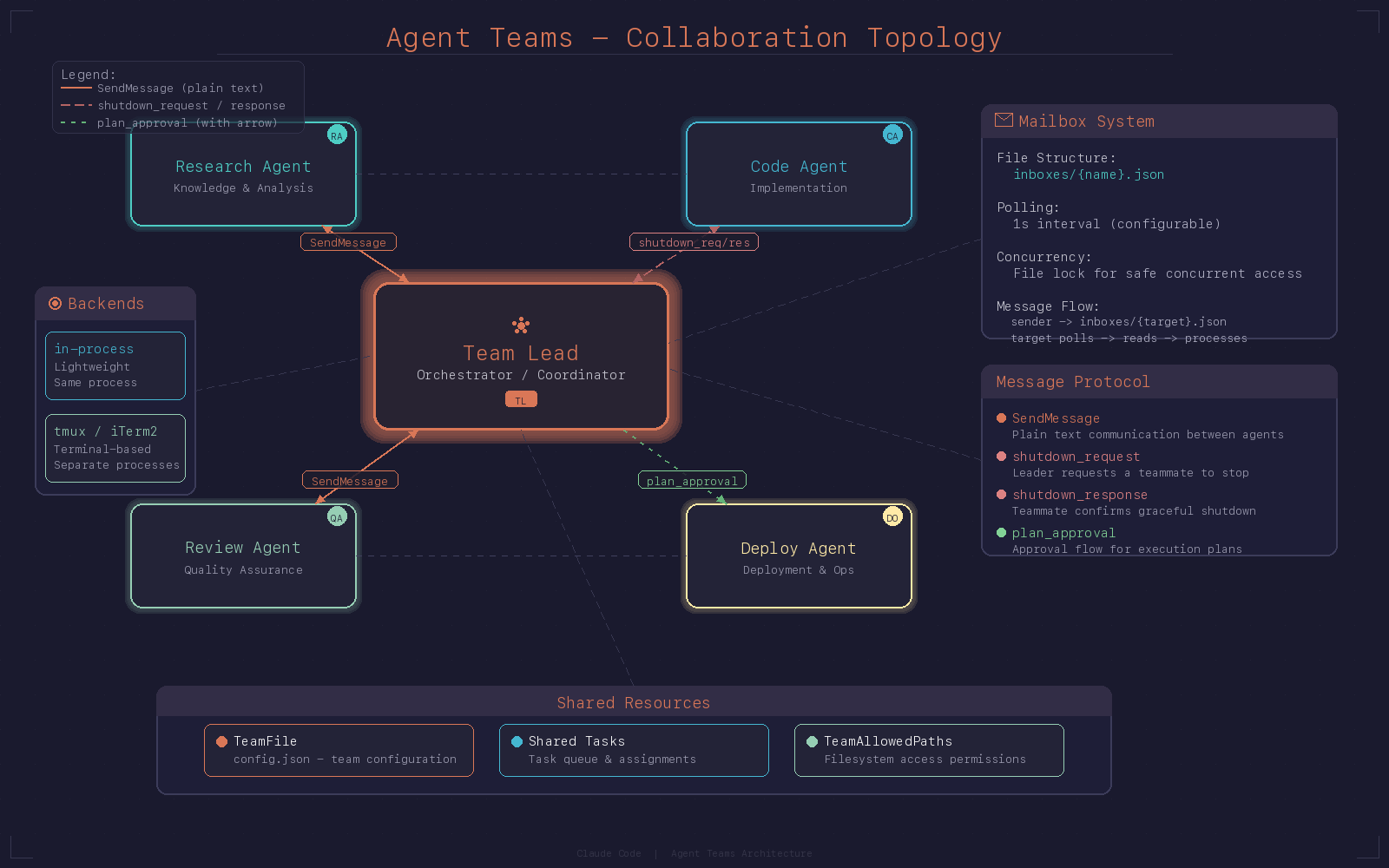
Agent Teams is an advanced multi-agent collaboration mode where multiple agents work as a team, coordinating tasks through message-based communication.
Creating a Team
TeamCreate({
  team_name: "feature-team",
  description: "Develop user authentication feature"
})
After team creation:
- A team configuration file is generated:
~/.claude/teams/{team_name}/config.json - A shared task directory is created:
~/.claude/tasks/{team_name}/ - The current agent automatically becomes the Team Lead
Adding Team Members
Spawn teammates by specifying name and team_name in the Agent tool:
Agent({
  description: "Frontend development",
  prompt: "Implement the login page React components...",
  name: "frontend-dev",
  team_name: "feature-team"
})

Agent({
  description: "Backend development",
  prompt: "Implement the authentication API endpoints...",
  name: "backend-dev",
  team_name: "feature-team"
})
Teammate Communication
Send messages using the SendMessage tool:
// Send to a specific teammate
SendMessage({
  to: "frontend-dev",
  message: "API interface is ready, the format is...",
  summary: "Notify API interface format"
})

// Broadcast to all teammates
SendMessage({
  to: "*",
  message: "Everyone pause, requirements have changed...",
  summary: "Broadcast requirements change"
})
Shutdown Coordination
When the task is complete, the Team Lead requests teammates to shut down:
// 1. Send shutdown request
SendMessage({
  to: "frontend-dev",
  message: { type: "shutdown_request", reason: "Task completed" }
})

// 2. Teammate responds with approval
SendMessage({
  to: "team-lead",
  message: { type: "shutdown_response", request_id: "...", approve: true }
})

// 3. After all teammates shut down, clean up the team
TeamDelete()
Execution Backends
Agent Teams supports two execution backends:
| Backend | Description | Use Case |
|---|---|---|
| in-process | Runs in the same process, isolated via AsyncLocalStorage | Default mode; lightweight and efficient |
| tmux | Runs in a separate tmux pane | When an independent terminal view is needed |
| iTerm2 | Runs in a separate iTerm2 window | For macOS iTerm2 users |
6. Custom Agents
In addition to built-in agents, you can create your own specialized agents.
Desktop Management and Scopes
In the desktop app, open Settings → Agents. The desktop app and CLI use the same Agent definition files; the configuration is not duplicated in a database or localStorage:
| Scope | Single source of truth | Use |
|---|---|---|
| User | ~/.claude/agents/*.md |
Available in every project |
| Project | <project-directory>/.claude/agents/*.md |
Available only in the current project; overrides a user Agent with the same name |
User and project Agents can be created, edited, and deleted from the desktop app, and saving writes directly to the corresponding Markdown file. Other sources, including built-in Agents, plugins, managed policy, and CLI arguments, also appear in the list but are read-only because the desktop app does not own their source files.
When the desktop app is connected to the active session, creating, editing, or deleting an Agent hot-reloads that session in place, so the next spawn uses the new definition immediately. If no runtime is available or the reload fails, the file is still saved; the desktop app shows a non-blocking warning, and the saved definition is loaded on the next launch.
Definition Format
Create a .md file in the user or project agents directory:
---
name: code-reviewer
description: Professional code review agent
tools:
  - Read
  - Grep
  - Glob
  - Bash
model: sonnet
effort: high
permissionMode: dontAsk
maxTurns: 10
---

You are a professional code reviewer. Check the following aspects:

1. Code quality and readability
2. Potential security vulnerabilities
3. Performance issues
4. Adherence to best practices
Configurable Fields
| Field | Type | Description |
|---|---|---|
name |
string | Agent type name |
description |
string | Description of when to use this agent |
tools |
string[] | Allowed tool list (['*'] for all) |
disallowedTools |
string[] | Disallowed tool list |
model |
string | Model to use (fable/opus/sonnet/haiku, a full model ID, or inherit) |
effort |
string | Reasoning effort (low/medium/high/xhigh/max), subject to model capabilities |
permissionMode |
string | Permission mode |
maxTurns |
number | Maximum conversation turns |
mcpServers |
object[] | Required MCP servers |
hooks |
object | Agent-specific hooks |
color |
string | Display color used for the Agent |
skills |
string[] | Available skills |
memory |
string | Memory scope (user/project/local) |
isolation |
string | Isolation mode (worktree/remote) |
background |
boolean | Whether to run in background by default |
Model, Reasoning Effort, and Thinking
To inherit from the current session, the clearest form is to omit the corresponding field: omit model to inherit the primary conversation model, and omit effort to inherit the current session effort. model: inherit is the equivalent explicit spelling for the model field; effort has no inherit value.
Model resolution uses this precedence, from highest to lowest:
- A concrete model in
CLAUDE_CODE_SUBAGENT_MODEL(inheritdoes not pin the model) - The model supplied to this
Agent({ ..., model: "..." })call modelin the Agent Markdown frontmatter- The primary conversation model
Reasoning effort resolution uses this precedence, from highest to lowest:
CLAUDE_CODE_EFFORT_LEVELeffortin the Agent Markdown frontmatter- The current session effort
- The model default
The Agent tool has no per-call effort parameter, so set it in the Agent definition or at the session level. Availability of low, medium, high, xhigh, and max depends on the resolved model and provider capabilities. Claude models fall back to a lower supported level, other providers normalize through their model catalogs, and models without effort support do not apply the field.
Integer effort values remain only for compatibility with existing SDK/JSON and internal configurations; they are not a recommended official Agent configuration. The desktop Agent manager writes only the five named levels above.
Subagents normally inherit the primary session's extended-thinking setting, but requirements of the resolved model take precedence; for example, Fable 5 is normalized to adaptive thinking. Per-Agent thinking and thinkingBudget frontmatter are not supported, and effort is not a fixed thinking-token budget.
Same-Name Source Priority
When several sources define an Agent with the same name, cc-haha selects the active definition in this order, from highest to lowest:
- Policy Agents (policy) — Organization-managed policy
- CLI argument Agents (flag) — Registered with
--agents - Project Agents (project) —
<project-directory>/.claude/agents/ - User Agents (user) —
~/.claude/agents/ - Plugin Agents (plugin) — Supplied by plugins
- Built-in Agents (built-in) — System predefined
The desktop app still shows overridden definitions and their sources, but spawning uses the highest-priority active definition.
7. Permission Modes
Each agent can be configured with a different permission mode:
| Mode | Description |
|---|---|
default |
Normal permission requests requiring user confirmation |
plan |
All operations require explicit approval |
acceptEdits |
File edits are auto-approved; other operations require confirmation |
bypassPermissions |
Skip all permission checks |
dontAsk |
Reject all operations not pre-approved |
auto |
AI-driven permission classification (Anthropic internal only) |
bubble |
Permission prompts bubble up to the parent agent's terminal |
8. Quick Reference
| Action | Method |
|---|---|
| Spawn a subagent | Agent({ prompt: "...", subagent_type: "Explore" }) |
| Run in background | Agent({ ..., run_in_background: true }) |
| Spawn in parallel | Send multiple Agent calls in a single message |
| Worktree isolation | Agent({ ..., isolation: "worktree" }) |
| Create a team | TeamCreate({ team_name: "..." }) |
| Send a message | SendMessage({ to: "name", message: "..." }) |
| Broadcast a message | SendMessage({ to: "*", message: "..." }) |
| Request shutdown | SendMessage({ to: "name", message: { type: "shutdown_request" } }) |
| Delete a team | TeamDelete() |
| Manage custom Agents | Desktop Settings → Agents, or edit ~/.claude/agents/*.md / <project-directory>/.claude/agents/*.md directly |
| Specify a model | Agent({ ..., model: "haiku" }) |
| Specify reasoning effort | Set effort: high in the Agent Markdown frontmatter |
| Name an agent | Agent({ ..., name: "researcher" }) |