mirror of
https://github.com/NanmiCoder/cc-haha
synced 2026-07-15 12:53:31 +08:00
 f9c42c3b40
- Add Tauri sidecar architecture: Rust shell spawns claude-server binary,
  dynamic port allocation, health-check wait loop, graceful shutdown
- Fix CORS middleware to accept `tauri://localhost` and `https://tauri.localhost`
  origins from Tauri WebView, and add CORS headers to /health endpoint
- Enable native macOS window decorations (traffic lights) with Overlay title bar,
  add data-tauri-drag-region on sidebar for window dragging
- Conditionally apply desktop-only padding (44px for traffic lights) vs web (12px)
- Generate brand identity: light-background app icon, horizontal logo, full icon
  set (icns/ico/png) for Tauri bundle
- Add brand mark + GitHub link in sidebar, replace mascot SVG with app icon
  in EmptySession page
- Update README (zh/en) and docs hero image with new branding
- Add sidecar build scripts and launcher entry points
- Gitignore Rust target/, Tauri gen/, and brand-assets candidates

Co-Authored-By: Claude Opus 4.6 <noreply@anthropic.com>
7.7 KiB
7.7 KiB
Claude Code Haha







基于 Claude Code 泄露源码修复的本地可运行版本,支持接入任意 Anthropic 兼容 API(如 MiniMax、OpenRouter 等)。
原始泄露源码无法直接运行。本仓库修复了启动链路中的多个阻塞问题,使完整的 Ink TUI 交互界面可以在本地工作。
功能 · 架构概览 · 快速开始 · 环境变量 · FAQ · 全局使用 · 更多文档
功能
- 完整的 Ink TUI 交互界面(与官方 Claude Code 一致)
--print无头模式(脚本/CI 场景)- 支持 MCP 服务器、插件、Skills
- 支持自定义 API 端点和模型(第三方模型使用指南)
- 记忆系统(跨会话持久化记忆)— 使用指南
- 多 Agent 系统(多代理编排、并行任务、Teams 协作)— 使用指南 | 实现原理
- Skills 系统(可扩展能力插件、自定义工作流)— 使用指南 | 实现原理
- Channel 系统(通过 Telegram/飞书/Discord 等 IM 远程控制 Agent)— 架构解析
- Computer Use 桌面控制 — 功能指南 | 架构解析
- 降级 Recovery CLI 模式(
CLAUDE_CODE_FORCE_RECOVERY_CLI=1 ./bin/claude-haha)
架构概览
 整体架构 |
 请求生命周期 |
 工具系统 |
 多 Agent 架构 |
 终端 UI |
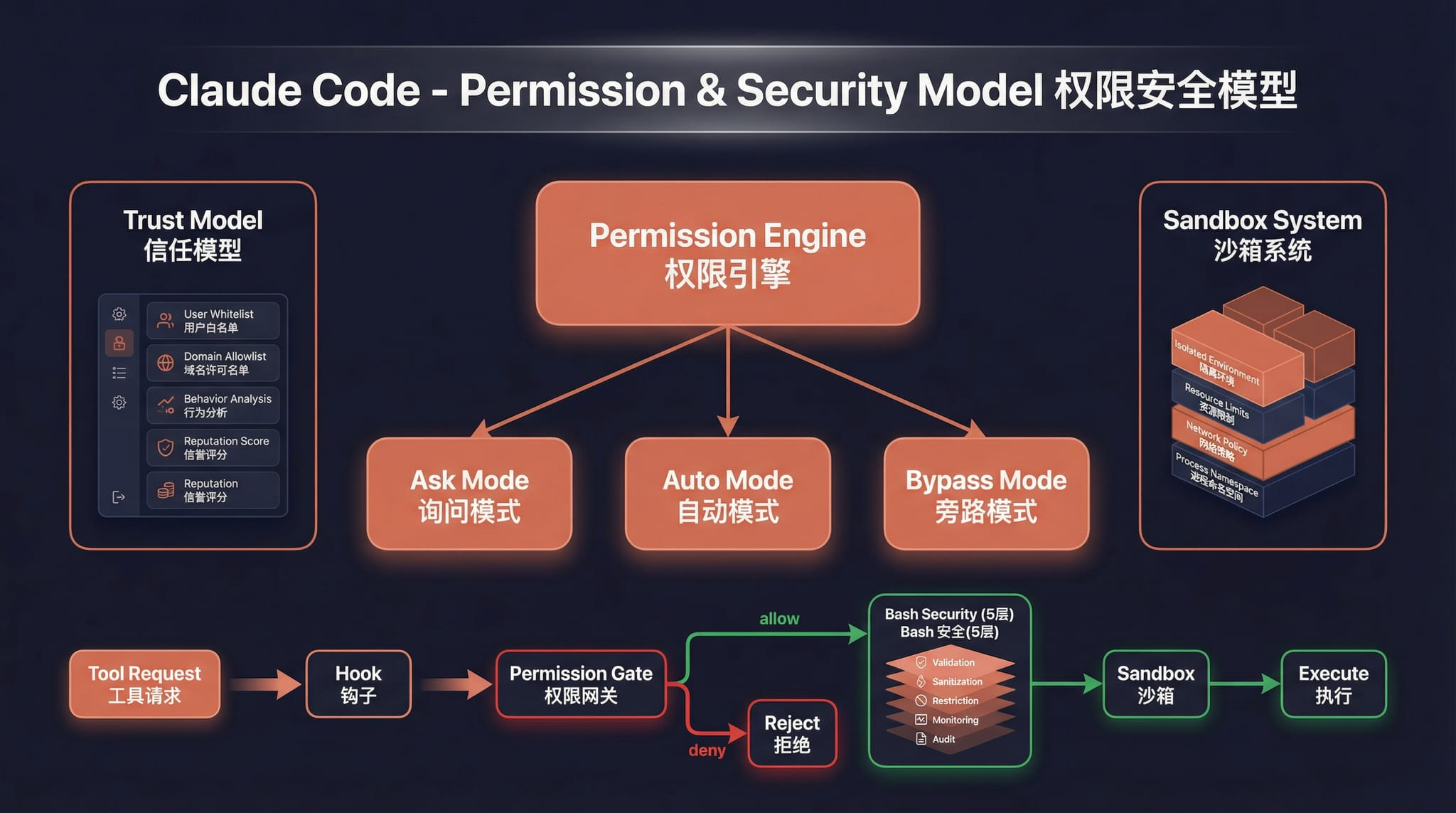 权限与安全 |
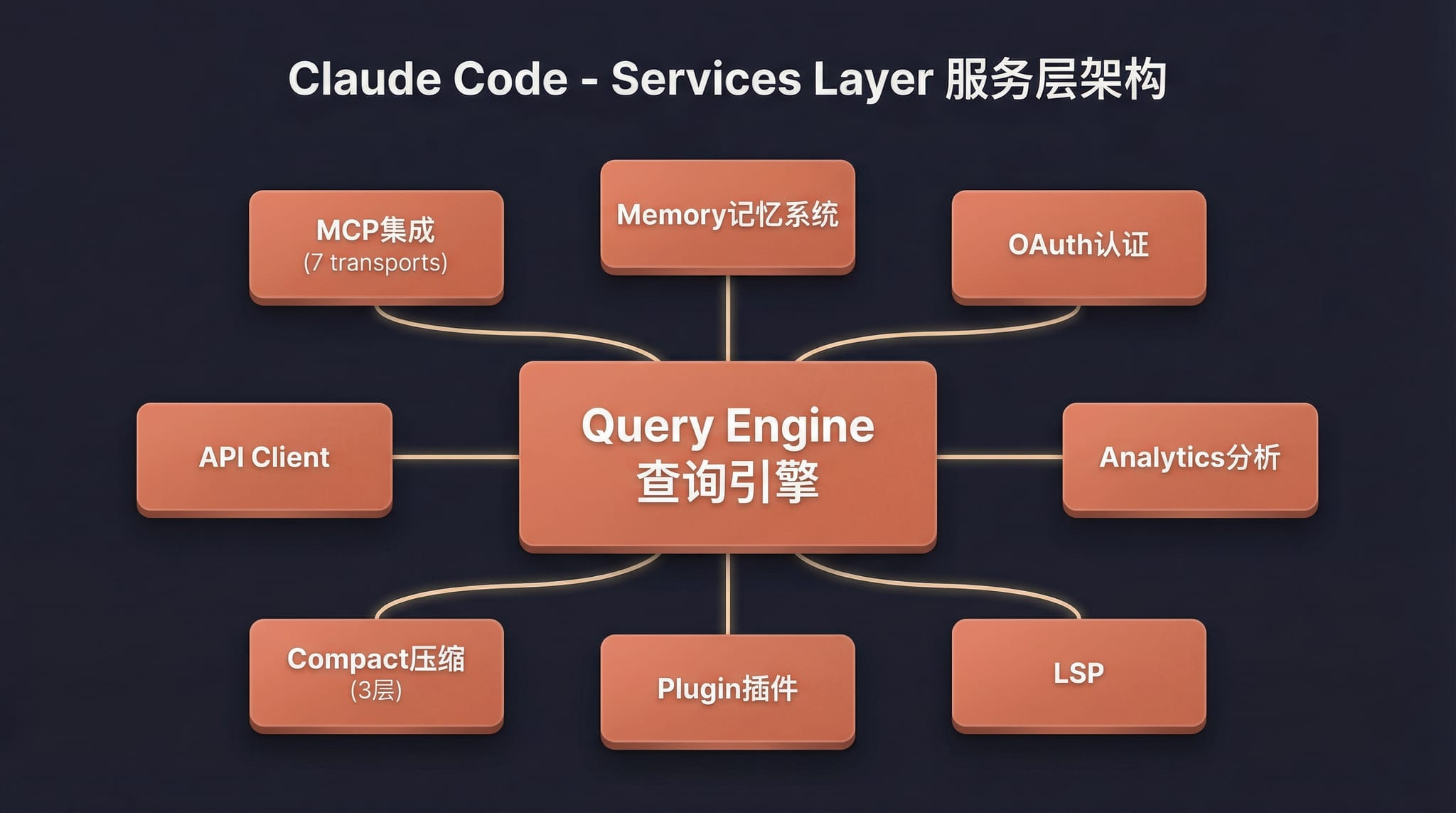 服务层 |
 状态与数据流 |
快速开始
1. 安装 Bun
# macOS / Linux
curl -fsSL https://bun.sh/install | bash

# macOS (Homebrew)
brew install bun

# Windows (PowerShell)
powershell -c "irm bun.sh/install.ps1 | iex"
精简版 Linux 如提示
unzip is required,先运行apt update && apt install -y unzip
2. 安装依赖并配置
bun install
cp .env.example .env
# 编辑 .env 填入你的 API Key,详见 docs/guide/env-vars.md
3. 启动
macOS / Linux
./bin/claude-haha                          # 交互 TUI 模式
./bin/claude-haha -p "your prompt here"    # 无头模式
./bin/claude-haha --help                   # 查看所有选项
Windows
前置要求:必须安装 Git for Windows
# PowerShell / cmd 直接调用 Bun
bun --env-file=.env ./src/entrypoints/cli.tsx

# 或在 Git Bash 中运行
./bin/claude-haha
4. 全局使用(可选)
将 bin/ 加入 PATH 后可在任意目录启动,详见 全局使用指南:
export PATH="$HOME/path/to/claude-code-haha/bin:$PATH"
5. 桌面端联调(Desktop)
如果你在开发或测试 desktop/ 前端,需要同时启动 API 服务端和桌面前端。
5.1 启动服务端
cd /Users/nanmi/workspace/myself_code/claude-code-haha
SERVER_PORT=3456 bun run src/server/index.ts
可选自检:
curl http://127.0.0.1:3456/health
5.2 启动桌面前端
cd /Users/nanmi/workspace/myself_code/claude-code-haha/desktop
bun run dev --host 127.0.0.1 --port 2024
然后在浏览器打开:
http://127.0.0.1:2024
5.3 常见注意事项
- 如果
3456端口已经被旧服务端占用,先执行lsof -nP -iTCP:3456 -sTCP:LISTEN找到 PID,再kill <PID>。 - 测试聊天时建议新建一个 session,并重新选择一个真实存在的工作目录。
- 如果某个旧 session 绑定的目录已被删除,服务端会返回
Working directory does not exist,这和服务端是否启动是两回事。
技术栈
| 类别 | 技术 |
|---|---|
| 运行时 | Bun |
| 语言 | TypeScript |
| 终端 UI | React + Ink |
| CLI 解析 | Commander.js |
| API | Anthropic SDK |
| 协议 | MCP, LSP |
更多文档
| 文档 | 说明 |
|---|---|
| 环境变量 | 完整环境变量参考和配置方式 |
| 第三方模型 | 接入 OpenAI / DeepSeek / Ollama 等非 Anthropic 模型 |
| 记忆系统 | 跨会话持久化记忆的使用与实现 |
| 多 Agent 系统 | 多代理编排、并行任务执行与 Teams 协作 |
| Skills 系统 | 可扩展能力插件、自定义工作流与条件激活 |
| Channel 系统 | 通过 Telegram/飞书/Discord 等 IM 平台远程控制 Agent |
| Computer Use | 桌面控制功能(截屏、鼠标、键盘)— 架构解析 |
| 全局使用 | 在任意目录启动 claude-haha |
| 常见问题 | 常见错误排查 |
| 源码修复记录 | 相对于原始泄露源码的修复内容 |
| 项目结构 | 代码目录结构说明 |
Disclaimer
本仓库基于 2026-03-31 从 Anthropic npm registry 泄露的 Claude Code 源码。所有原始源码版权归 Anthropic 所有。仅供学习和研究用途。