 c2cd615824
The site had drifted from the product. Every screenshot predated the
v0.5.0 UI redesign, the reading experience shipped no search and no
syntax highlighting, and a third of the pages were internal process
artefacts — migration task lists addressed to agentic workers, a
release runbook, a proposal marked "historical".

Reorganise around the only two people who read this: someone getting
the desktop app running for the first time, and someone reading the
source. Five sections replace nine — start / desktop / im / cli /
internals — and the pages that served neither reader are gone.

Site rewrite:

- Palette lifted from the desktop app's 「纸·墨·印」 themes, so the
  site and the product read as one thing. Light mirrors 纯白, dark
  mirrors 墨夜, and dark mode exists at all now.
- Fonts are self-hosted. The old @import from Google Fonts is
  unreachable from mainland China, which left every heading in a
  fallback serif; it also only requested weight 600 while the CSS
  asked for 900, so Latin and CJK in the same heading disagreed.
- Docs were shipped as one 968KB manifest downloaded on every page
  view. Split into a 32KB index plus one lazily imported chunk per
  page; the entry bundle is now 101KB gzipped.
- Add search, syntax highlighting, per-route meta with canonical and
  hreflang, a sitemap, and an error boundary. Replace the 44vh
  mobile sidebar with a drawer.
- Image dimensions are read at build time and written into the tag,
  so lazy images reserve their space instead of collapsing.

Screenshots are recaptured from a real v0.5.0 build against a clean
demo project, with tokens, QR codes and paired accounts redacted.
The previous set is deleted rather than kept alongside.

Routes follow file paths, so the restructure would have broken every
inbound link; 37 old paths redirect, in both languages. The PR policy
gate and CODEOWNERS also hardcoded docs/guide/contributing.md.

Verified: check:docs 78 pages / 323 links / 0 problems, check:policy
127 pass. Walked every route at 1440 and 390 in both themes for
overflow, contrast, keyboard reachability and focus management.
4.7 KiB
| title | nav_title | description | order |
|---|---|---|---|
| Subagents | Subagents | When to delegate, which agents ship built in, and how to write your own. | 3 |
Subagents
A subagent is a copy of Claude sent off with one clearly scoped job. It works in its own context and reports back only the conclusion.
The point is that your main conversation doesn't get flooded. Ask "find every call site of validateUser in this repo" and, if the main agent searches itself, dozens of files end up in the context window. Delegate it and all that comes back is the list.
When to delegate
- Questions that require reading a lot of files — finding usages, untangling dependencies, counting where a pattern occurs.
- Independent work that can run in parallel — frontend, backend, and tests at the same time.
- The same thing from several angles — several agents each reviewing the same code.
Conversely: if you already know the file and the line, just say so. No need for the detour.
Delegated agents appear under SubAgents in the Activity panel with their tool activity streaming live. Open one to read its full transcript and final result. Background agents work the same way — you don't have to wait for them to finish to see what they're doing.
Built-in agents
Available without any setup:
| Name | What it's for |
|---|---|
general-purpose |
The catch-all. Researching complex questions, searching for code, multi-step tasks |
Explore |
Fast codebase exploration. Find files by pattern, search code by keyword, answer "how does this part work" |
Plan |
The architect. Designs an implementation strategy and returns step-by-step plans, critical files, and trade-offs |
claude-code-guide |
Answers questions about Claude Code, the Agent SDK, and the Claude API themselves |
verification |
Sign-off before you call it done. Runs builds, tests, and linters and returns PASS / FAIL / PARTIAL with evidence |
statusline-setup |
Configures the Claude Code status line |
You can name one directly ("use Explore to find…") or let Claude decide who to send.
Seeing what's installed

Open Settings → Agents. Three cards at the top show total agents, how many are active, and how many sources are in play. Below that, agents are grouped by source in a fixed order:
User → Project → Local → Managed → Plugin → CLI arg → Built-in
When two agents share a name, the higher source wins and the shadowed one is tagged "Overridden by X". Day to day, two groups matter:
- User — the ones you wrote, available in every project, stored in
~/.claude/agents/. - Project — scoped to the current project, stored in its
.claude/agents/, shipped with the repo.
Click any row for its detail page: model, effort, tool scope, and the full system prompt. Built-in and plugin agents are read-only and show a lock pill instead of edit controls.
Writing your own
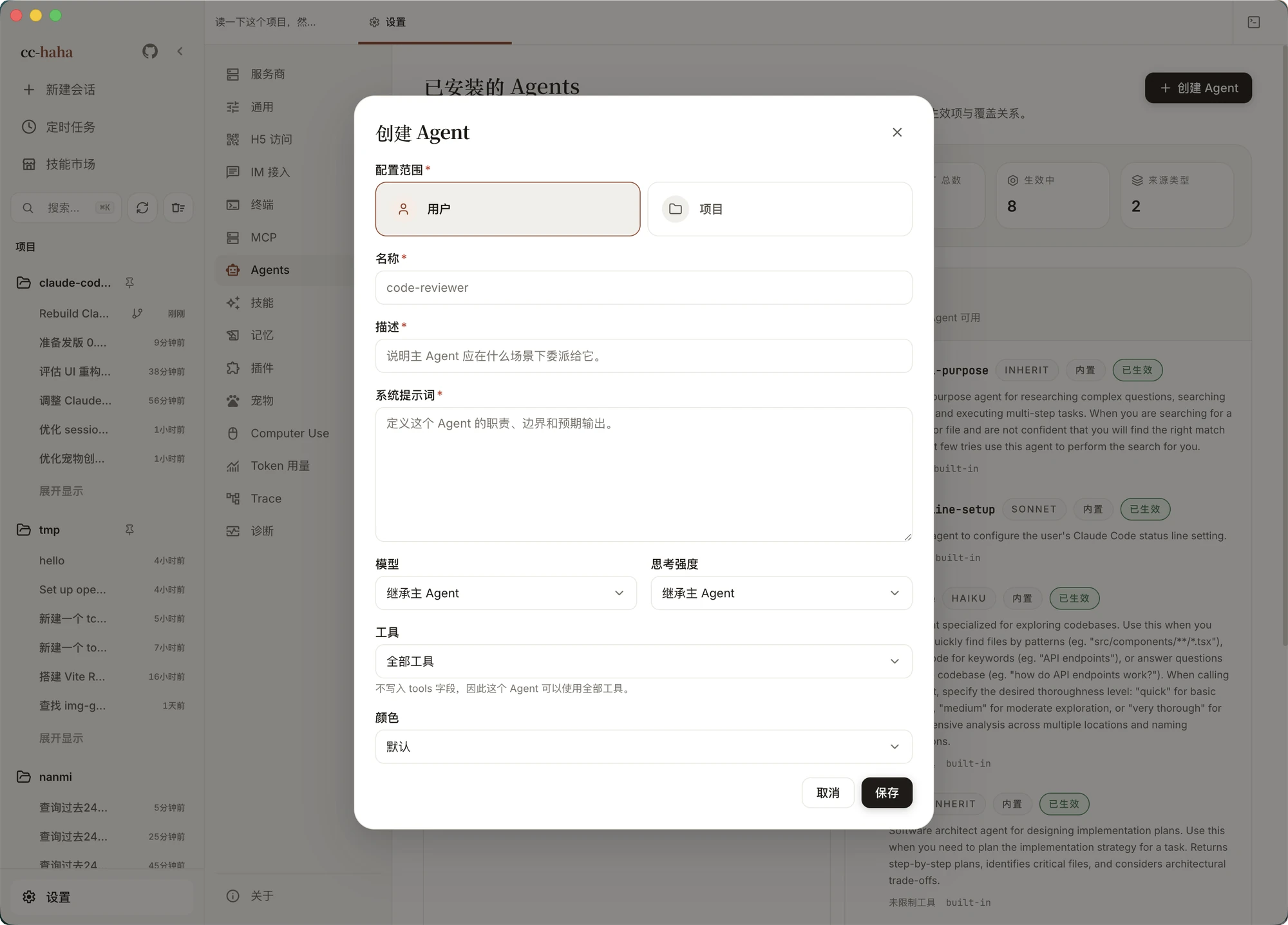
Click Create Agent in the top right. The fields:
- Scope — user or project. Choosing project asks you to confirm the target path.
- Name — 1–64 lowercase letters, digits, hyphens, or underscores, e.g.
code-reviewer. This is what the main agent calls it by. - Description — when the main agent should delegate to it. This is the field that matters most: it's what the main agent reads to decide whether to call this agent at all. Write it vaguely and the agent will never be used.
- System prompt — its responsibilities, boundaries, and expected output.
- Model — inherit from the main agent, or pick Haiku / Sonnet / Opus / Fable, or enter a custom model ID. Simple repetitive work is faster and cheaper on Haiku.
- Effort — inherit, or set low / medium / high / xhigh / max. Models that don't support a level downgrade or ignore it.
- Tools — all tools, no tools, or a custom list. The custom picker groups built-in tools by read and search, modify files, execute commands, and workflow, with a free-text field below for MCP tool names or permission rules like
Bash(git:*). - Color — optional, purely for telling agents apart in the UI.
Saving writes a Markdown file into the matching directory and refreshes the current session. A failed refresh doesn't roll back the file — it still applies after a restart.
:::tip Grant only the tools the job needs. An agent whose job is to read code and report back doesn't need Write or Bash. Narrow the permissions and you narrow how far it can go wrong. :::
For the agent file format, source precedence, and inheritance rules, see Agent internals.