 c2cd615824
The site had drifted from the product. Every screenshot predated the
v0.5.0 UI redesign, the reading experience shipped no search and no
syntax highlighting, and a third of the pages were internal process
artefacts — migration task lists addressed to agentic workers, a
release runbook, a proposal marked "historical".

Reorganise around the only two people who read this: someone getting
the desktop app running for the first time, and someone reading the
source. Five sections replace nine — start / desktop / im / cli /
internals — and the pages that served neither reader are gone.

Site rewrite:

- Palette lifted from the desktop app's 「纸·墨·印」 themes, so the
  site and the product read as one thing. Light mirrors 纯白, dark
  mirrors 墨夜, and dark mode exists at all now.
- Fonts are self-hosted. The old @import from Google Fonts is
  unreachable from mainland China, which left every heading in a
  fallback serif; it also only requested weight 600 while the CSS
  asked for 900, so Latin and CJK in the same heading disagreed.
- Docs were shipped as one 968KB manifest downloaded on every page
  view. Split into a 32KB index plus one lazily imported chunk per
  page; the entry bundle is now 101KB gzipped.
- Add search, syntax highlighting, per-route meta with canonical and
  hreflang, a sitemap, and an error boundary. Replace the 44vh
  mobile sidebar with a drawer.
- Image dimensions are read at build time and written into the tag,
  so lazy images reserve their space instead of collapsing.

Screenshots are recaptured from a real v0.5.0 build against a clean
demo project, with tokens, QR codes and paired accounts redacted.
The previous set is deleted rather than kept alongside.

Routes follow file paths, so the restructure would have broken every
inbound link; 37 old paths redirect, in both languages. The PR policy
gate and CODEOWNERS also hardcoded docs/guide/contributing.md.

Verified: check:docs 78 pages / 323 links / 0 problems, check:policy
127 pass. Walked every route at 1440 and 390 in both themes for
overflow, contrast, keyboard reachability and focus management.
8.7 KiB
| title | nav_title | description | order |
|---|---|---|---|
| Settings reference | Settings | All 16 settings tabs — what each one configures and when you'd need it. | 6 |
Settings reference
Click Settings at the bottom of the sidebar. Sixteen tabs on the left, in a fixed order. This page walks through them in that order: what each one configures, and when you'd actually need to touch it.
Providers
Model access. Sign in to Claude, ChatGPT, or Grok with an account (no API key required), or add any Anthropic- or OpenAI-compatible service with an API key.
You'll come here once during setup and rarely again. Full steps in Connecting a model.
General
The tab you'll open most often — everything about how the app feels.
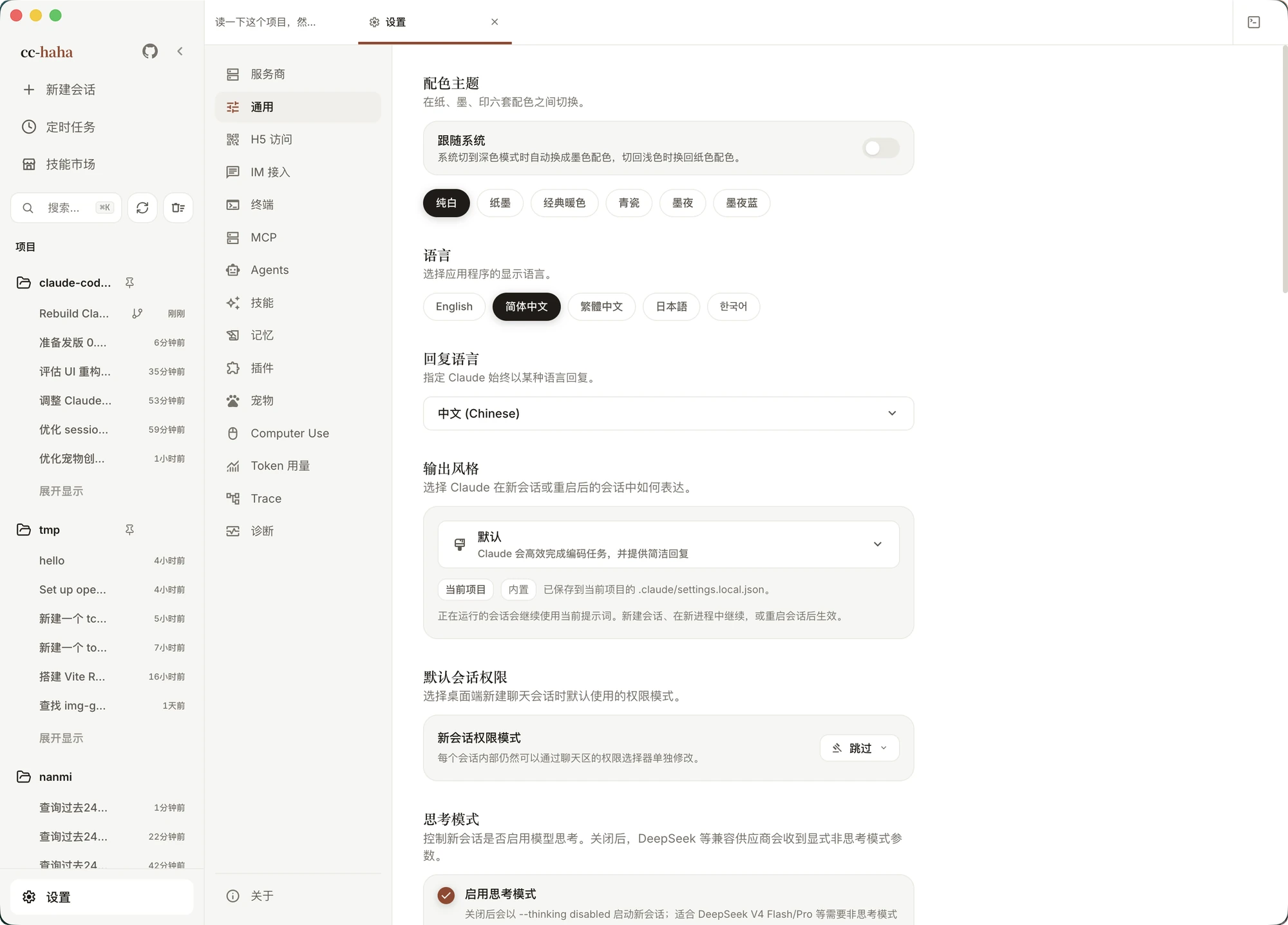
- Color theme — six of them: Pure White (default), Paper, Warm Classic, Celadon, Ink Night, Ink Blue. There's also Follow the system, which lets you pick which theme to use in light mode and which in dark mode.
- Language — the interface language.
- Response Language — makes Claude always reply in a given language, set independently of the interface.
- Output Style — Default, Explanatory, or Learning. Explanatory adds reasoning about implementation choices and codebase patterns; Learning pauses and asks you to write small pieces yourself. Running sessions keep their current prompt; the change applies to new sessions.
- Default Session Permissions — which permission mode new sessions start in. Each session can still be changed individually.
- Effort Level and Thinking Mode — defaults for new sessions. Turning thinking off sends an explicit non-thinking parameter to providers like DeepSeek that need one.
- Message Sending — Enter to send (Shift+Enter for a newline), or
Ctrl/Cmd+Enterto send. - System Notifications — route permission prompts, completed replies, and scheduled task results to the OS notification center. Enabling it requests system permission.
- Network — three modes: Direct connection (explicitly bypass the system proxy), System proxy (follow system or PAC rules per destination), or Manual proxy (a URL like
http://user:password@127.0.0.1:7890). Below that, AI request timeout, which can go up to 1800 seconds when a provider is slow to first byte. App updates use their own proxy setting, over in About. - WebSearch — how web search is routed. Auto prefers Claude's native WebSearch for Claude models and falls back to Tavily or Brave otherwise; those two need API keys you supply.
- Auto-dream — periodically tidies and compresses memory files in the background. Off by default, because it spends tokens.
- UI Zoom — scale the whole interface, also bound to
⌘+/⌘-, with⌘0back to 100%. - Data Storage Location — an advanced, rarely-touched setting. Defaults to the system directory
~/.claude, or point it at an absolute path of your own. After switching, sessions, skills, MCP, plugins, and provider config are all read from the new directory; it needs a restart, and the two directories are never merged or migrated automatically.
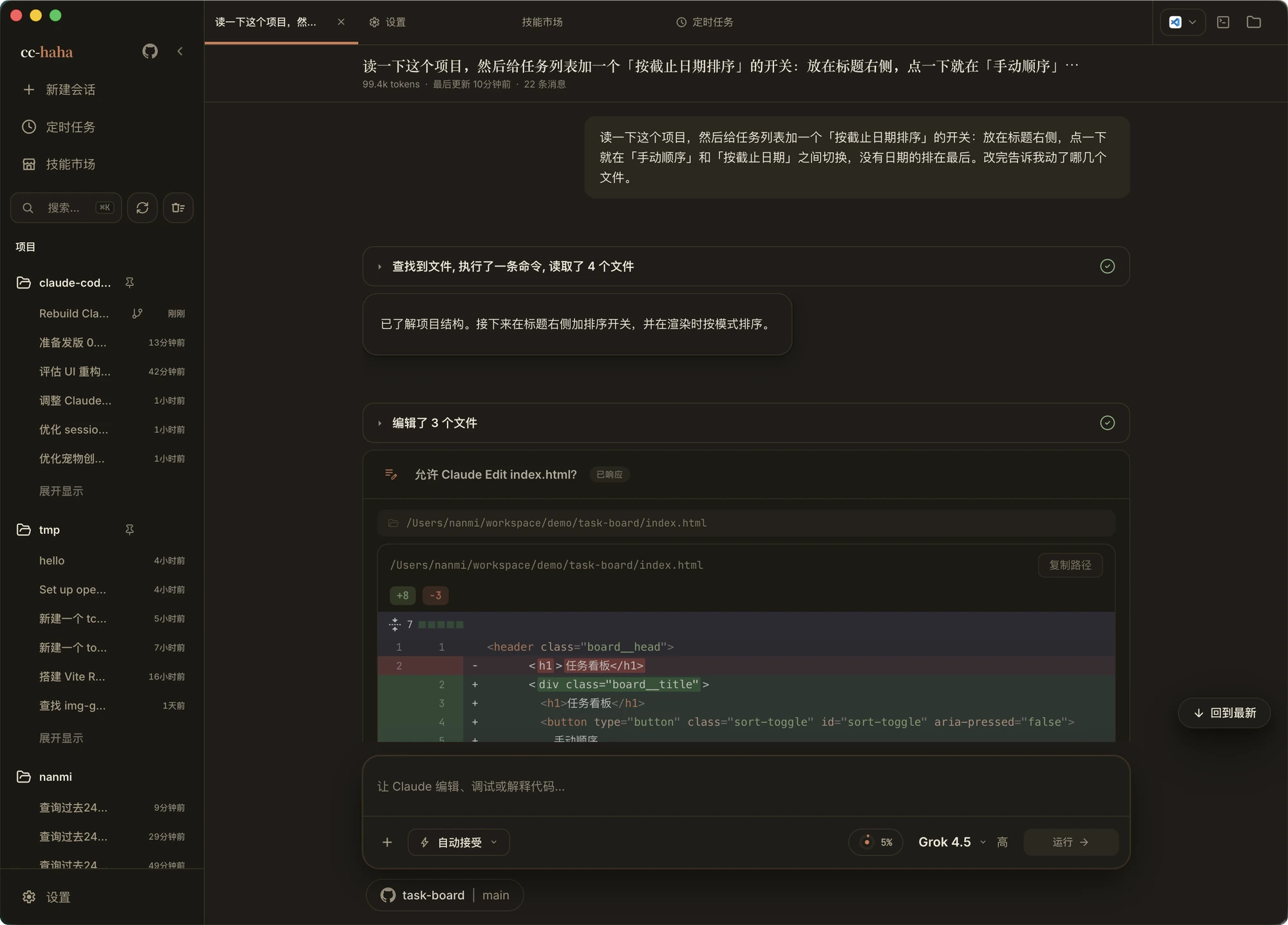
H5 Access
Continue the same session in your phone's browser. Off by default. See Phone (H5) and IM.
IM Adapters
Talk to Claude from WeChat, DingTalk, WhatsApp, Telegram, or Feishu, and manage paired users. See Phone (H5) and IM and IM integrations.
Terminal
A real host shell embedded in the app, for installing plugins, skills, MCP servers, and anything else that needs a command line. The desktop app bundles claude-haha, so anywhere the docs say claude <args> you can run claude-haha <args>.
On Windows you can also choose the startup shell (system default, PowerShell 7, Windows PowerShell, Command Prompt, or a custom executable) and set a Bash path — used when a tool calls Unix commands like grep or sed, usually pointing at Git Bash.
MCP
External tools and data sources. STDIO, Streamable HTTP, and SSE transports are supported, and the scopes match the CLI:
- Local — only for you, but bound to one project.
- Project — written to the project's
.mcp.jsonand shared with the team. - User — written to your global config, active in every project.
The three numbers at the top are total servers, currently connected, and needs attention. STDIO commands run directly on your machine, so runtimes like Node, Python, and Bun must be installed and on your PATH.
Agents
Browse installed agents and create your own. See Subagents.
Skills
Every skill available on this machine, grouped by source, with the prose and source files readable in place. See Skills and the Skills Market.
Memory
View and edit the Markdown memory files Claude keeps per project. Pick a project on the left, a file in the middle, then edit or preview the rendered output. The files live in ~/.claude/projects/<project>/memory/ and are loaded by the CLI at runtime.
/memory in any session jumps straight here. For how memory is written and recalled, see Memory system.
Plugins
A plugin bundles skills, agents, hooks, and MCP servers together. This tab shows installed plugins, their health, and what capabilities each one exposes, with enable, disable, update, and uninstall — including multi-select for bulk operations.
After enabling or disabling anything, click Apply changes to push the change into the running runtime.
Pets
A little robot floating on your desktop. Off by default. See Desktop pet.
Computer Use
Let Claude read the screen, click, and type. Unusable until you install the runtime environment and grant system permissions. See Computer Use.
Token usage
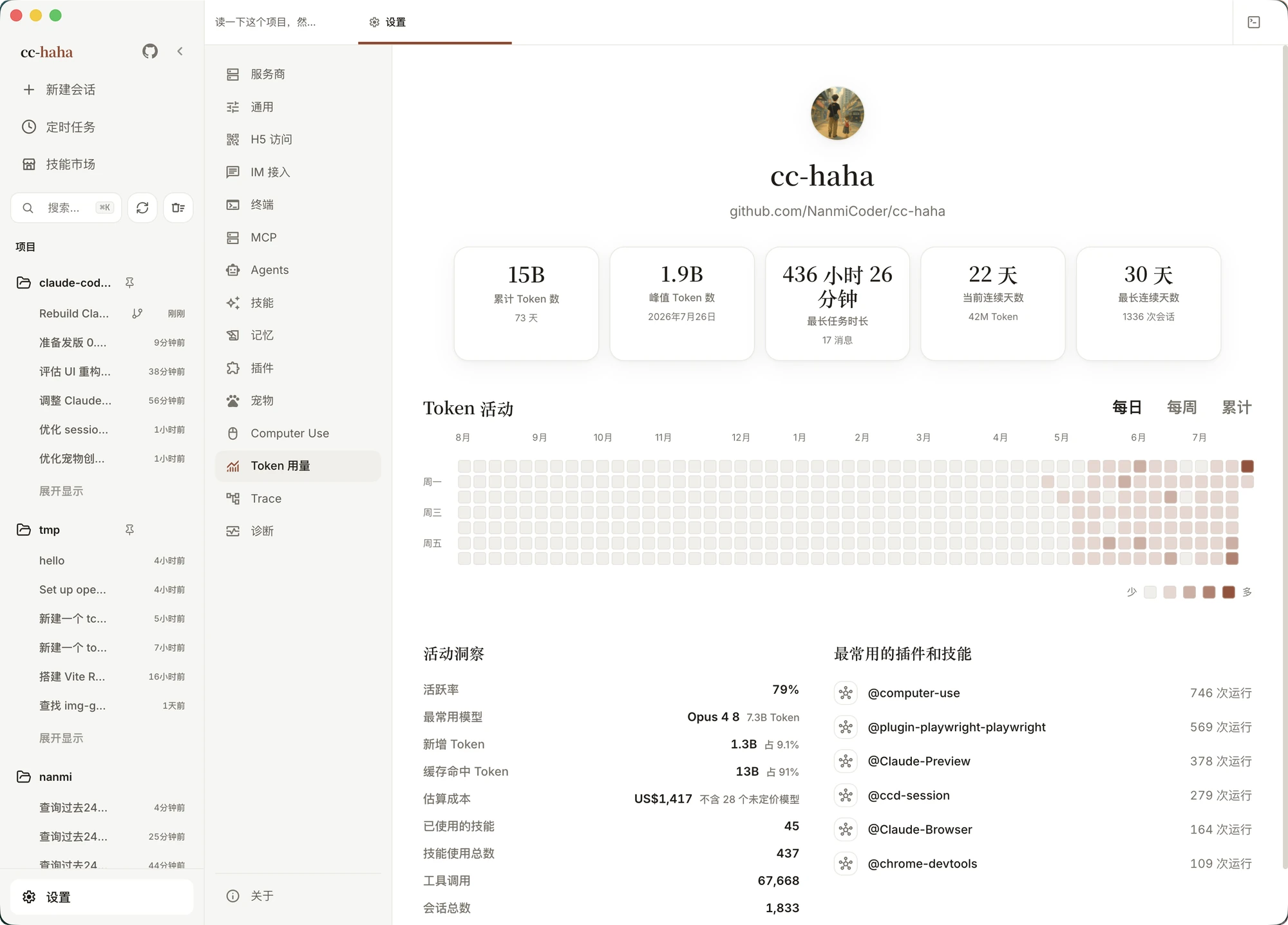
A usage dashboard computed from the Claude Code session records on this machine. Everything is calculated locally and nothing is uploaded.
- Across the top: total tokens, peak tokens, longest task, current and longest streak.
- In the middle: a heatmap with daily, weekly, and cumulative views. Click a day for that day's sessions, tokens, messages, and tool calls.
- Below: activity insights — active rate, most-used model, skills used, fresh versus cache-hit token split, and estimated cost. Estimated cost excludes models with no known price, and the UI says how many were skipped.
Trace
Records the model request chain for each session — requests, responses, status events, timings — for debugging stalls, failures, and unexplained waits. The switch isn't on this tab: turn on Agent trace in Settings → General first, and this tab fills up.
Once enabled, new sessions write condensed records to a local traces directory. Existing records stay readable after you turn it off; only new ones stop being written. The trace list supports search, filtering (all / LLM / tools / errors), opening a trace in its own window, and deleting a session's trace without touching its chat history.
Diagnostics
Where to go when something breaks. Logs server and CLI startup, provider, and session runtime errors.
- Across the top: log size, event count, warnings in the last 24 hours, retention policy.
- Recent events lists the actual errors, each with an event ID you can copy on its own.
- Export Bundle / Copy error summary / Copy issue report — use the latter two when filing an issue; they're already formatted.
- Doctor — checks user and current-project configuration state, read-only, returning a healthy / not configured / missing / invalid list.
/doctorin a session opens it directly. - Reset safe UI state — clears only regenerable interface keys like open tabs, theme, and zoom. Chat history, model config, skills, MCP, IM, and OAuth are always protected and never touched.
- Local index — status and size of the derived SQLite index, with a rebuild button. Rebuilding only affects the index; source conversations are never deleted.
:::info Issue reports and exported bundles are redacted on a best-effort basis — chat contents, file contents, full environment variables, and API keys are omitted. Still give them a read before sharing, in case an internal hostname, username, or path slipped through. :::
About
Version, changelog, GitHub repo, feedback link.
App Updates checks GitHub Releases, downloads, and restarts to install. Updates use their own proxy setting, separate from Settings → General — if updates stall on a corporate network, configure the advanced update proxy here.