mirror of
https://github.com/NanmiCoder/cc-haha
synced 2026-07-31 16:33:34 +08:00
 c2cd615824
The site had drifted from the product. Every screenshot predated the
v0.5.0 UI redesign, the reading experience shipped no search and no
syntax highlighting, and a third of the pages were internal process
artefacts — migration task lists addressed to agentic workers, a
release runbook, a proposal marked "historical".

Reorganise around the only two people who read this: someone getting
the desktop app running for the first time, and someone reading the
source. Five sections replace nine — start / desktop / im / cli /
internals — and the pages that served neither reader are gone.

Site rewrite:

- Palette lifted from the desktop app's 「纸·墨·印」 themes, so the
  site and the product read as one thing. Light mirrors 纯白, dark
  mirrors 墨夜, and dark mode exists at all now.
- Fonts are self-hosted. The old @import from Google Fonts is
  unreachable from mainland China, which left every heading in a
  fallback serif; it also only requested weight 600 while the CSS
  asked for 900, so Latin and CJK in the same heading disagreed.
- Docs were shipped as one 968KB manifest downloaded on every page
  view. Split into a 32KB index plus one lazily imported chunk per
  page; the entry bundle is now 101KB gzipped.
- Add search, syntax highlighting, per-route meta with canonical and
  hreflang, a sitemap, and an error boundary. Replace the 44vh
  mobile sidebar with a drawer.
- Image dimensions are read at build time and written into the tag,
  so lazy images reserve their space instead of collapsing.

Screenshots are recaptured from a real v0.5.0 build against a clean
demo project, with tokens, QR codes and paired accounts redacted.
The previous set is deleted rather than kept alongside.

Routes follow file paths, so the restructure would have broken every
inbound link; 37 old paths redirect, in both languages. The PR policy
gate and CODEOWNERS also hardcoded docs/guide/contributing.md.

Verified: check:docs 78 pages / 323 links / 0 problems, check:policy
127 pass. Walked every route at 1440 and 390 in both themes for
overflow, contrast, keyboard reachability and focus management.
3.7 KiB
3.7 KiB
| title | nav_title | description | order |
|---|---|---|---|
| 工作区 | 工作区 | 右侧工作区:看改了哪些文件、逐行评审 Diff、在应用里预览网页。 | 2 |
工作区
对话告诉你 Claude 说了什么,工作区告诉你它真的改了什么。它是右侧一块可以随时拉出来的面板,和对话并排,不用切窗口。
打开工作区
点标签栏右侧的文件夹图标。再点一次收起。面板左边界可以拖动改宽窄。
面板顶部有个「文件 ⇄ 浏览器」的切换:
- 文件 — 看项目文件和 Git 改动,做 Diff 评审。
- 浏览器 — 内置浏览器,用来预览刚改完的页面。
已更改文件 / 所有文件
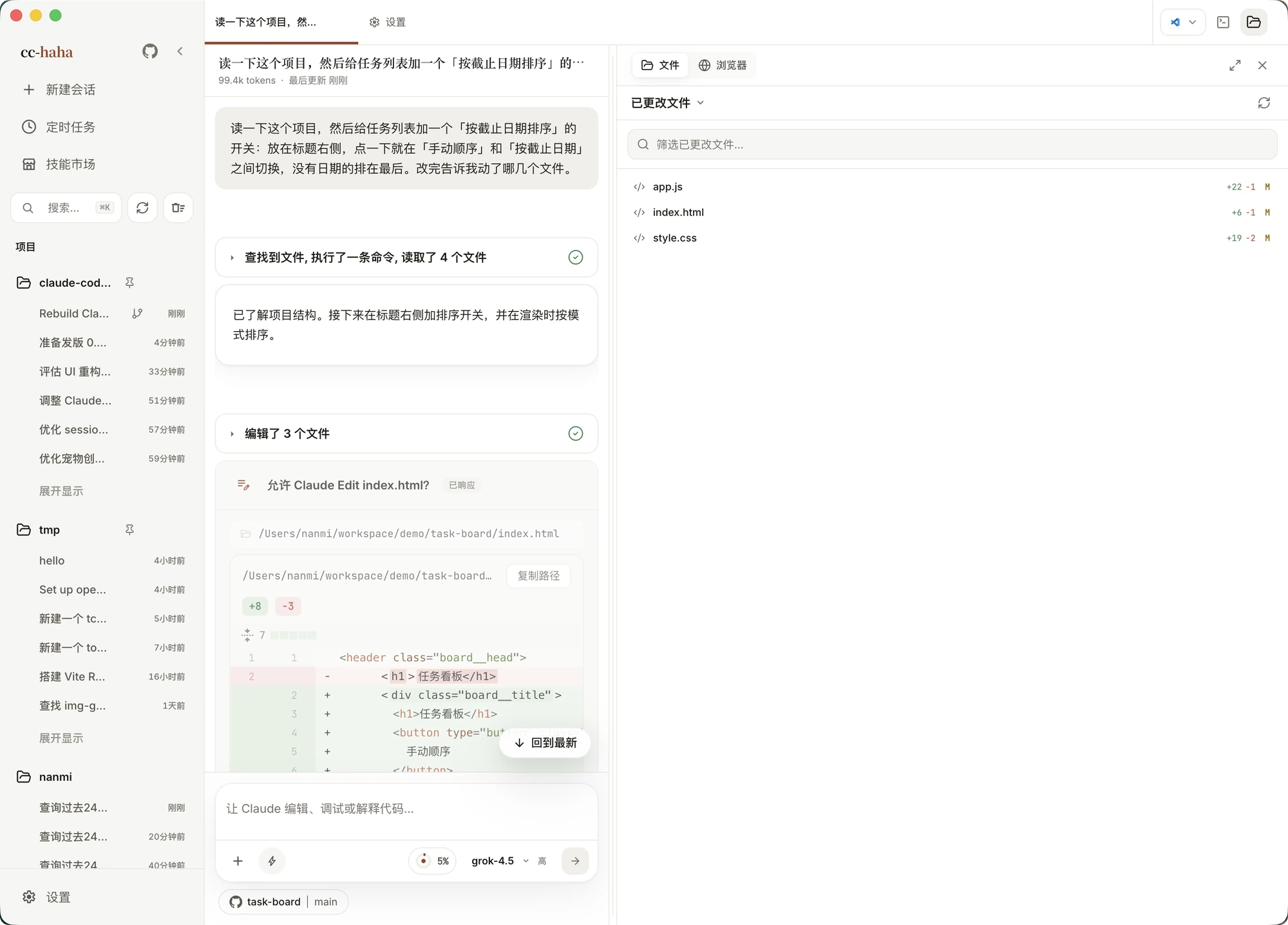
文件模式下有两个视图:
- 已更改文件 — 只列这个 Git 仓库里当前有改动的文件,每行带状态(已修改 / 已新增 / 已删除 / 已重命名 / 未跟踪)和增删行数。这是审阅时最常待的地方。
- 所有文件 — 完整目录树。上面的搜索框可以搜整个项目的文件名,也能搜还没展开的目录。
点文件名打开预览,双列显示 Diff 或单文件内容。预览标签会累积,像编辑器的标签一样切换。
不是 Git 仓库时「已更改文件」会直接说明,不是出错。
任何文件都可以右键复制路径,或者点「添加到聊天」把它作为上下文塞回输入框。
Diff 评审:给某一行留话
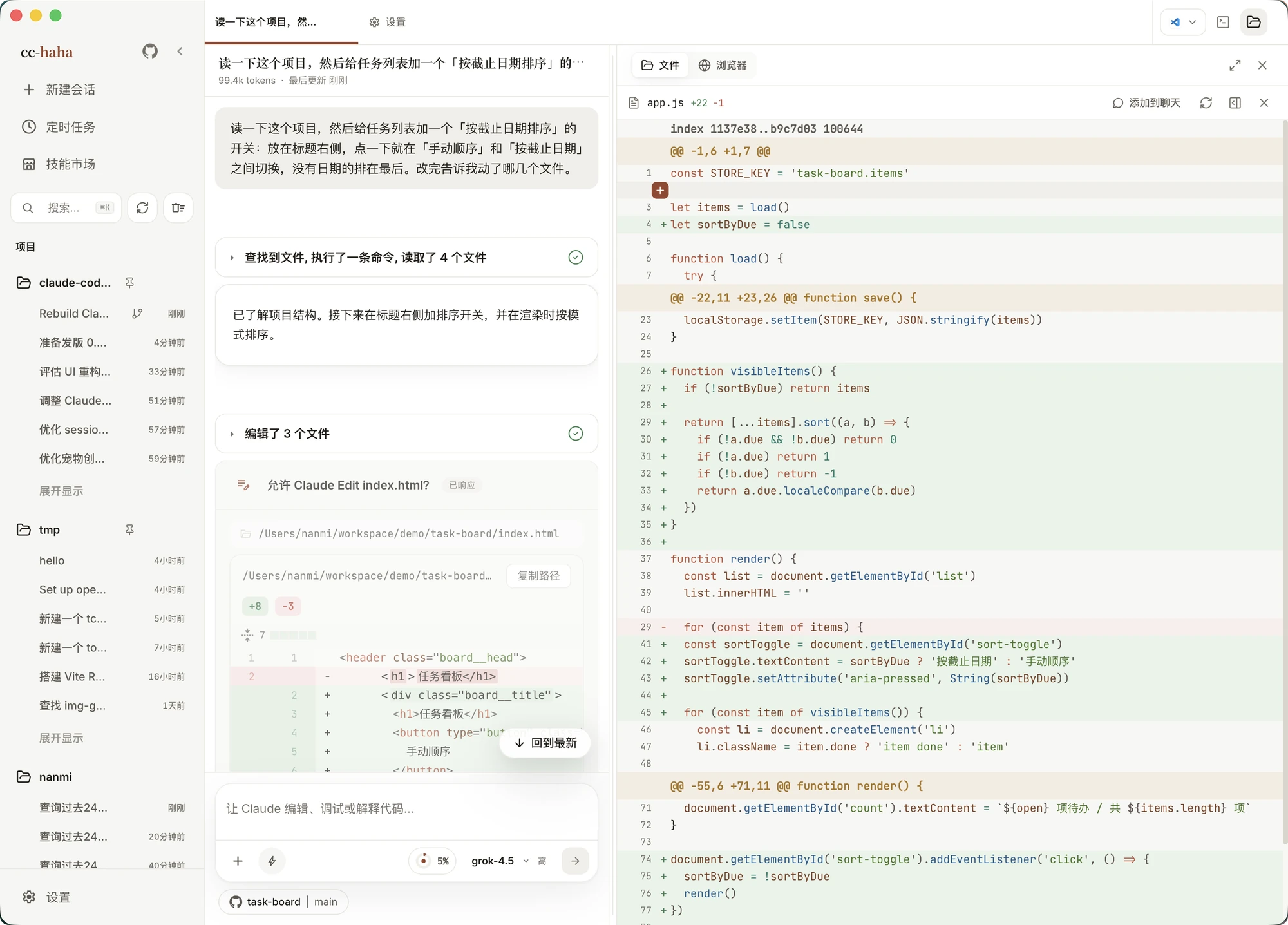
Diff 保留旧行和新行,带语法高亮。真正有用的是行级评论:
- 点某一行,右边出现评论框。
- 想评一段而不是一行,按住
Shift点起止行——只能选同一侧、同一变更块里的连续行。 - 写下你希望这里怎么改,点「提交」。
- 评论会连同文件路径、行号和那几行代码一起回到输入框,直接发给 Claude。
这比在对话里描述「那个函数里判断空值那行」准确得多。
如果你在写评论的过程中 Claude 又改了这个文件,界面会提示差异已更新,需要重新选行——这是防止评论落到错误的位置。
:::tip
被拒绝的工具调用不会写盘,也就不会出现在已更改文件里。交付前还是建议自己再过一遍 git diff。
:::
独立工作树:把试验关在笼子里
在输入框的运行位置里可以选「独立工作树」。选了以后,这条会话会拿到一个隔离的 Git worktree,Claude 的所有改动都发生在那里,你当前分支和工作目录一个字都不会动。
什么时候用它:
- 想让 Claude 大改一版,但不确定要不要留。
- 当前目录有未提交的改动,直接切分支会被 Git 拦住。
- 目标分支已经在别的工作树里检出了。
会话结束后临时工作区会被清理,历史记录仍然可以看,但那时想继续就得回原项目新建会话——界面会提示你。
内置浏览器
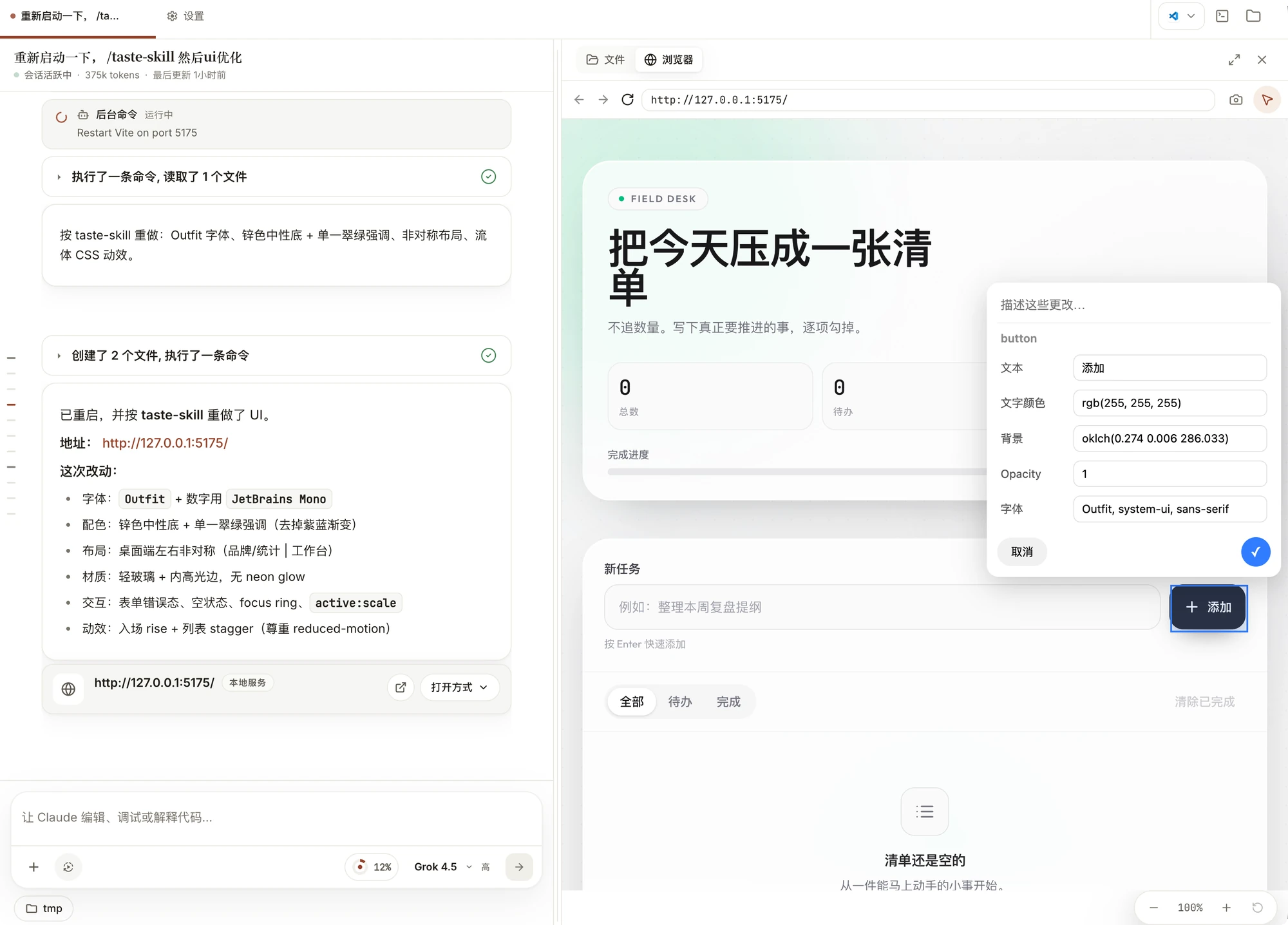
把工作区切到「浏览器」,地址栏里填本地开发地址或者任意网址就能预览。这里有三个专门为「让 Claude 看见」设计的按钮:
- 截图 — 把当前页面画面带回会话,Claude 就能看到渲染结果。
- 选择元素 — 在页面上点一个元素,它的选择器、位置和截图会一起作为上下文交给 Claude。改样式时特别省事。
- 缩放 — 调预览比例,看响应式布局。
浏览器里的登录态和 Cookie 和普通浏览器一样是真实的。做公开演示或者截图发出去之前,请换成不需要登录的页面。