 b4ad6f15de
When all buffered text has already been flushed via periodic timer,
buf.complete() calls flush(true) which returns early on empty buffer,
skipping the onFlush callback that cleans up placeholder state.
This causes subsequent messages to keep editing the old completed
message instead of creating a new one.

Add explicit placeholder cleanup in message_complete handler as
a safety net, matching the same pattern used for tool_use finalization.

Co-Authored-By: Claude Opus 4.6 (1M context) <noreply@anthropic.com>
Claude Code Haha








A locally runnable version repaired from the leaked Claude Code source, with support for any Anthropic-compatible API endpoint such as MiniMax and OpenRouter.
The original leaked source does not run as-is. This repository fixes multiple blocking issues in the startup path so the full Ink TUI can work locally.
Features · Architecture · Quick Start · Env Vars · FAQ · Global Usage · More Docs
Features
- Full Ink TUI experience (matching the official Claude Code interface)
--printheadless mode for scripts and CI- MCP server, plugin, and Skills support
- Custom API endpoint and model support (Third-Party Models Guide)
- Memory System (cross-session persistent memory) — Usage Guide
- Multi-Agent System (agent orchestration, parallel tasks, Teams collaboration) — Usage Guide | Implementation
- Skills System (extensible capability plugins, custom workflows) — Usage Guide | Implementation
- Channel System (remote Agent control via Telegram/Feishu/Discord IM platforms) — Architecture
- Computer Use desktop control — Guide | Architecture
- Fallback Recovery CLI mode (
CLAUDE_CODE_FORCE_RECOVERY_CLI=1 ./bin/claude-haha)
Architecture Overview
 Overall architecture |
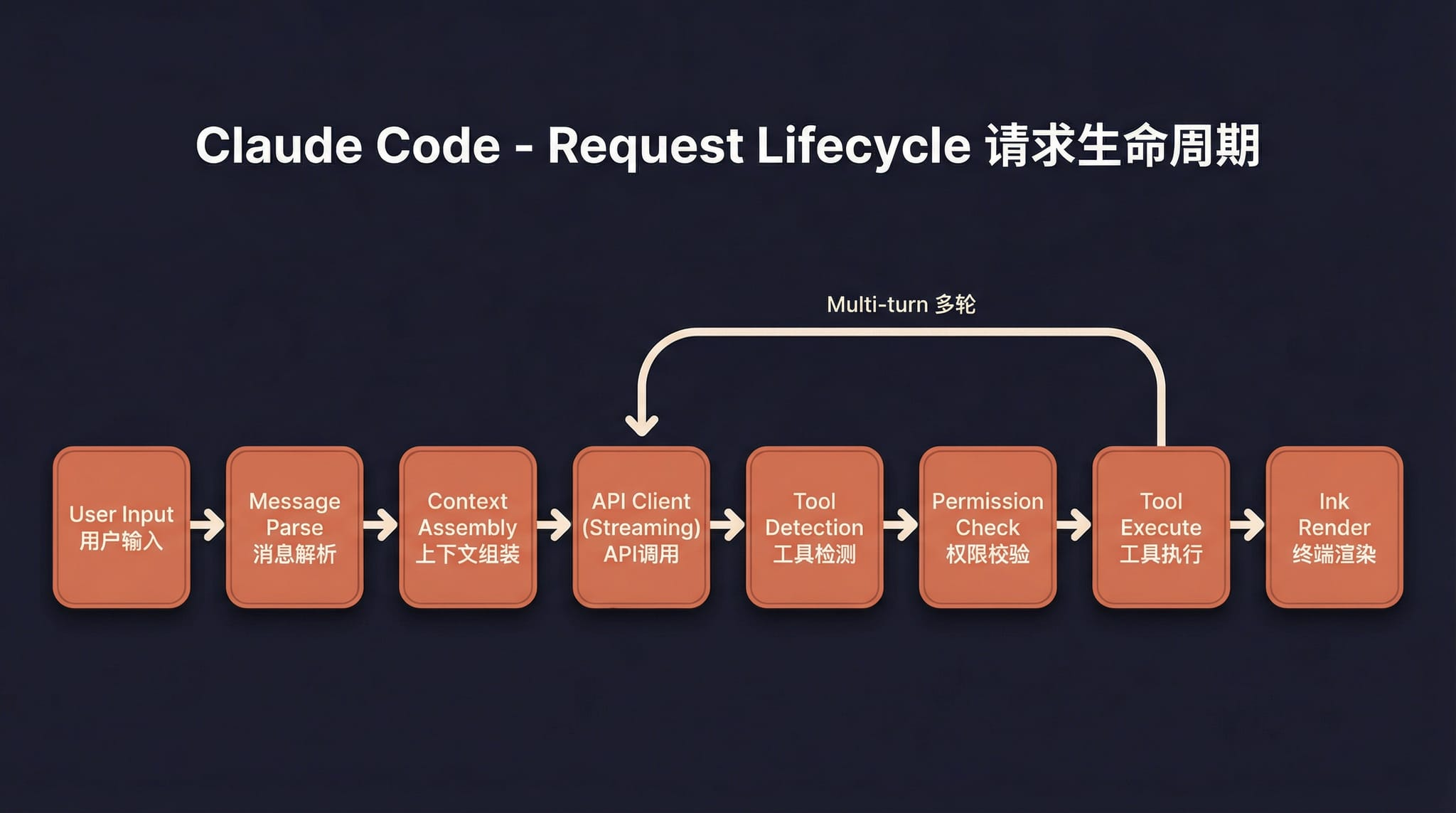 Request lifecycle |
 Tool system |
 Multi-agent architecture |
 Terminal UI |
 Permissions and security |
 Services layer |
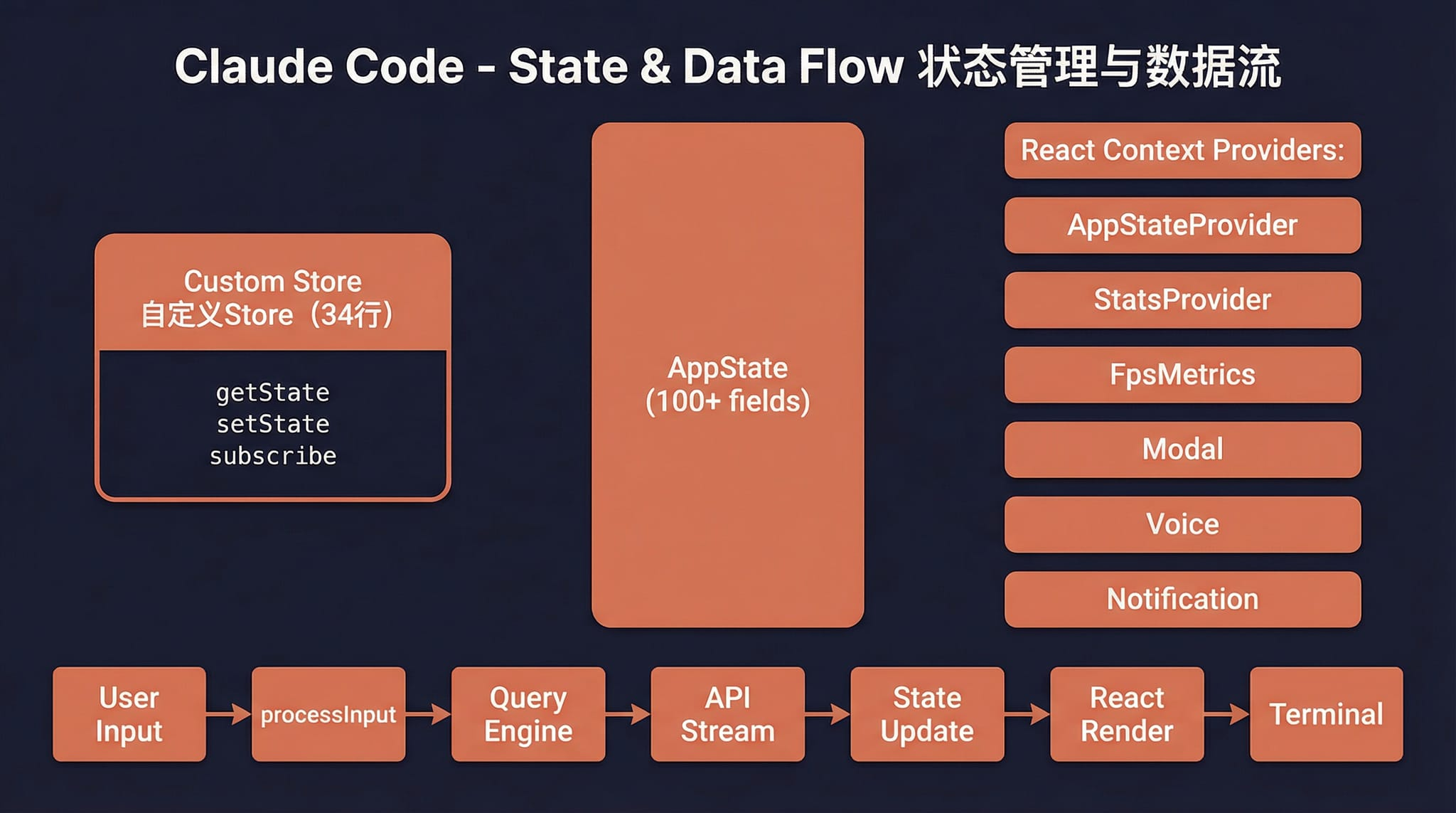 State and data flow |
Quick Start
1. Install Bun
# macOS / Linux
curl -fsSL https://bun.sh/install | bash

# macOS (Homebrew)
brew install bun

# Windows (PowerShell)
powershell -c "irm bun.sh/install.ps1 | iex"
On minimal Linux images, if you see
unzip is required, runapt update && apt install -y unzipfirst.
2. Install Dependencies and Configure
bun install
cp .env.example .env
# Edit .env with your API key — see docs/en/guide/env-vars.md for details
3. Start
macOS / Linux
./bin/claude-haha                          # Interactive TUI mode
./bin/claude-haha -p "your prompt here"    # Headless mode
./bin/claude-haha --help                   # Show all options
Windows
Prerequisite: Git for Windows must be installed.
# PowerShell / cmd — call Bun directly
bun --env-file=.env ./src/entrypoints/cli.tsx

# Or run inside Git Bash
./bin/claude-haha
4. Global Usage (Optional)
Add bin/ to your PATH to run from any directory. See Global Usage Guide:
export PATH="$HOME/path/to/claude-code-haha/bin:$PATH"
5. Desktop Development
If you are developing or testing the desktop/ frontend, start both the API server and the desktop frontend.
5.1 Start the API server
cd /Users/nanmi/workspace/myself_code/claude-code-haha
SERVER_PORT=3456 bun run src/server/index.ts
Optional health check:
curl http://127.0.0.1:3456/health
5.2 Start the desktop frontend
cd /Users/nanmi/workspace/myself_code/claude-code-haha/desktop
bun run dev --host 127.0.0.1 --port 2024
Then open:
http://127.0.0.1:2024
5.3 Notes
- If port
3456is already occupied by an old server process, runlsof -nP -iTCP:3456 -sTCP:LISTEN, find the PID, thenkill <PID>. - For chat testing, create a fresh session and re-select a real working directory.
- If an old session points to a deleted directory, the server will return
Working directory does not exist. That is separate from whether the API server is running.
Tech Stack
| Category | Technology |
|---|---|
| Runtime | Bun |
| Language | TypeScript |
| Terminal UI | React + Ink |
| CLI parsing | Commander.js |
| API | Anthropic SDK |
| Protocols | MCP, LSP |
More Documentation
| Document | Description |
|---|---|
| Environment Variables | Full env var reference and configuration methods |
| Third-Party Models | Using OpenAI / DeepSeek / Ollama and other non-Anthropic models |
| Memory System | Cross-session persistent memory usage and implementation |
| Multi-Agent System | Agent orchestration, parallel tasks and Teams collaboration |
| Skills System | Extensible capability plugins, custom workflows and conditional activation |
| Channel System | Remote Agent control via Telegram/Feishu/Discord IM platforms |
| Computer Use | Desktop control (screenshots, mouse, keyboard) — Architecture |
| Global Usage | Run claude-haha from any directory |
| FAQ | Common error troubleshooting |
| Source Fixes | Fixes compared with the original leaked source |
| Project Structure | Code directory structure |
Disclaimer
This repository is based on the Claude Code source leaked from the Anthropic npm registry on 2026-03-31. All original source code copyrights belong to Anthropic. It is provided for learning and research purposes only.