 91b4d16dc5
The desktop chat view flattened Agent tool activity, which made sub-agent work
hard to follow and separated key evidence from the main conversation. This
change threads parent tool linkage through the server bridge and desktop store,
renders dispatched sub-agents as grouped cards with nested tool activity, and
moves long final outputs into a markdown preview dialog so the main transcript
stays readable on narrow layouts.

Constraint: Existing sessions and live websocket events both needed to preserve parent-child relationships
Rejected: Add brand-new subagent websocket event types | unnecessary protocol expansion when parent linkage already existed upstream
Rejected: Inline full sub-agent markdown in the card body | too cramped for narrow desktop chat layouts
Confidence: medium
Scope-risk: moderate
Reversibility: clean
Directive: Keep Agent card summaries compact; route long-form sub-agent output through the preview dialog unless the main chat layout is widened substantially
Tested: cd desktop && bun run test -- MessageList.test.tsx chatStore.test.ts
Tested: cd desktop && bun run lint
Tested: bun test src/server/__tests__/sessions.test.ts -t should\ reconstruct\ parent\ agent\ tool\ linkage\ from\ parentUuid\ chains
Not-tested: Full end-to-end visual verification against live CLI sessions with sub-agent text/thinking nested inline
Claude Code Haha









A locally runnable version repaired from the leaked Claude Code source, with support for any Anthropic-compatible API endpoint such as MiniMax and OpenRouter.
The original leaked source does not run as-is. This repository fixes multiple blocking issues in the startup path so the full Ink TUI can work locally.
Features · Architecture · Quick Start · Env Vars · FAQ · Global Usage · More Docs
Features
- Full Ink TUI experience (matching the official Claude Code interface)
--printheadless mode for scripts and CI- MCP server, plugin, and Skills support
- Custom API endpoint and model support (Third-Party Models Guide)
- Memory System (cross-session persistent memory) — Usage Guide
- Multi-Agent System (agent orchestration, parallel tasks, Teams collaboration) — Usage Guide | Implementation
- Skills System (extensible capability plugins, custom workflows) — Usage Guide | Implementation
- Channel System (remote Agent control via Telegram/Feishu/Discord IM platforms) — Architecture
- Computer Use desktop control — Guide | Architecture
- Fallback Recovery CLI mode (
CLAUDE_CODE_FORCE_RECOVERY_CLI=1 ./bin/claude-haha)
Architecture Overview
 Overall architecture |
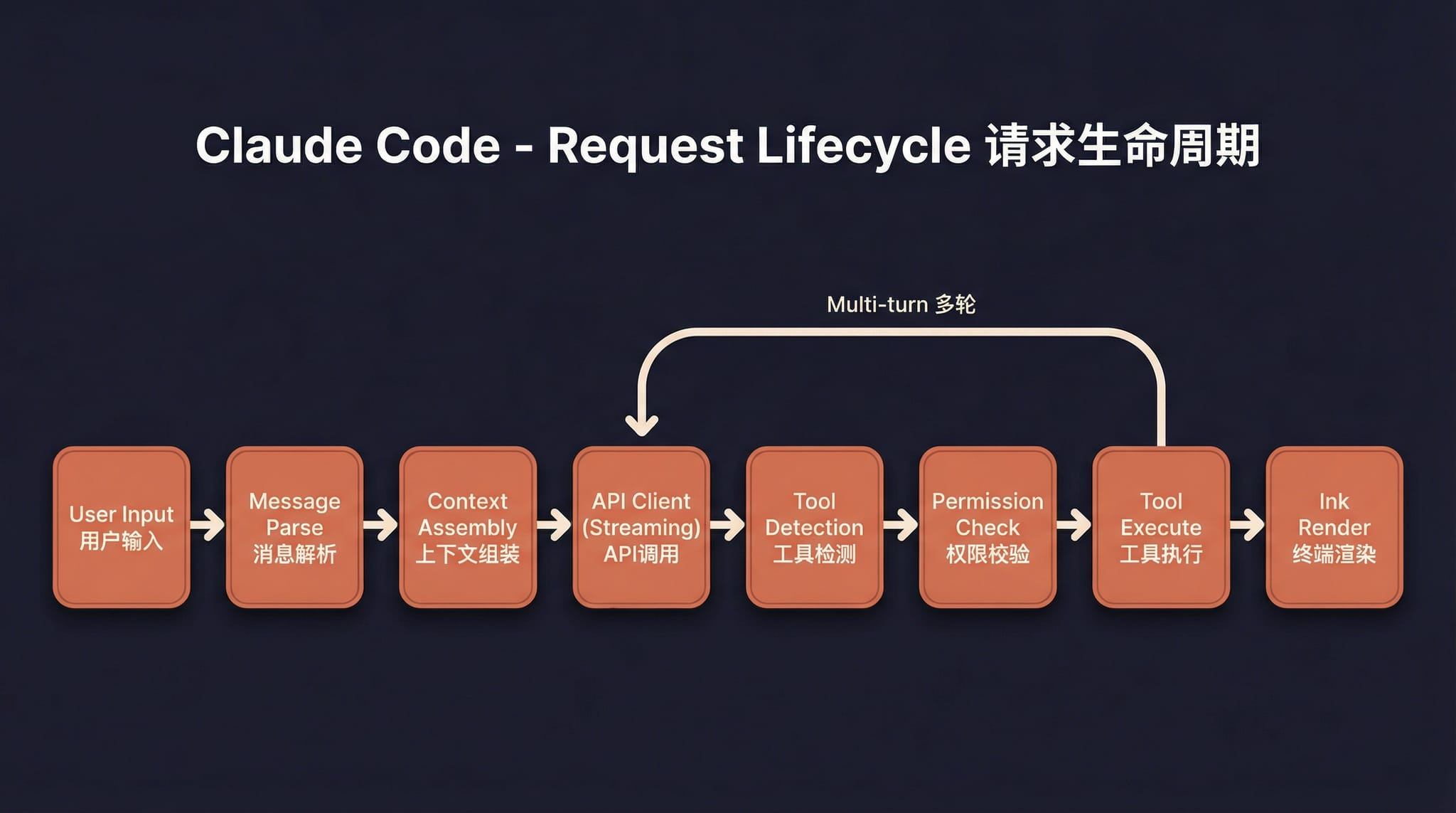 Request lifecycle |
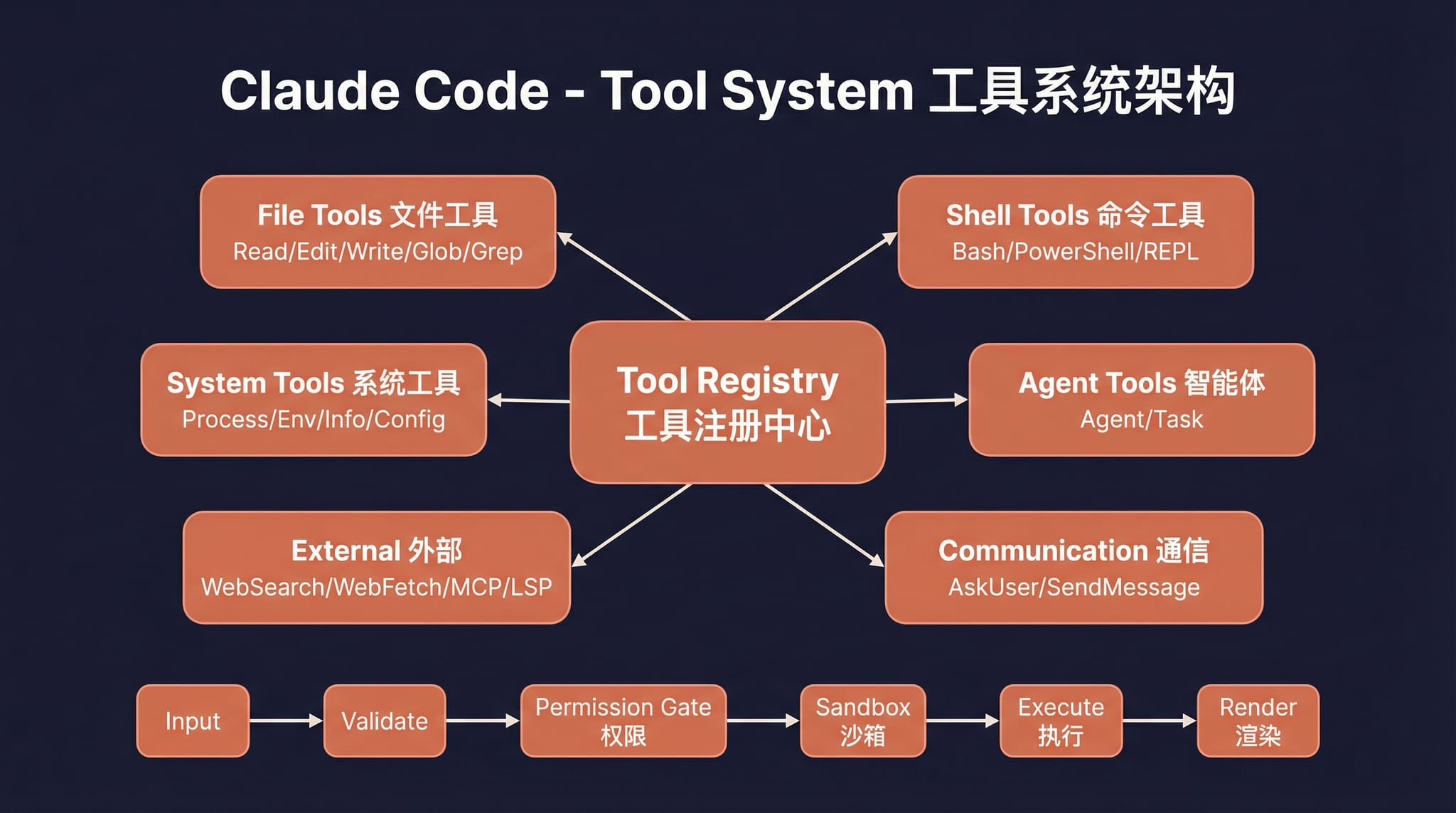 Tool system |
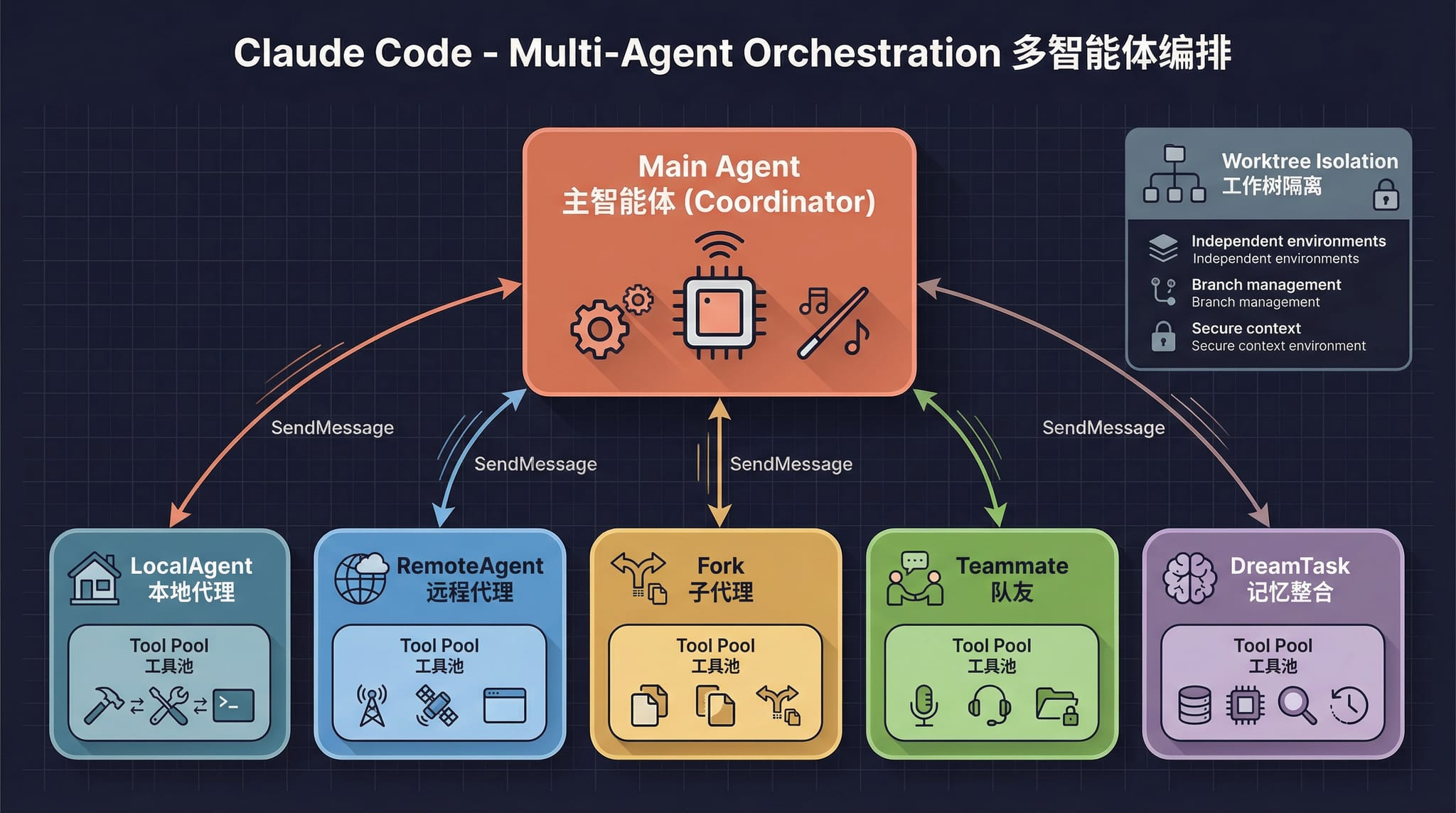 Multi-agent architecture |
 Terminal UI |
 Permissions and security |
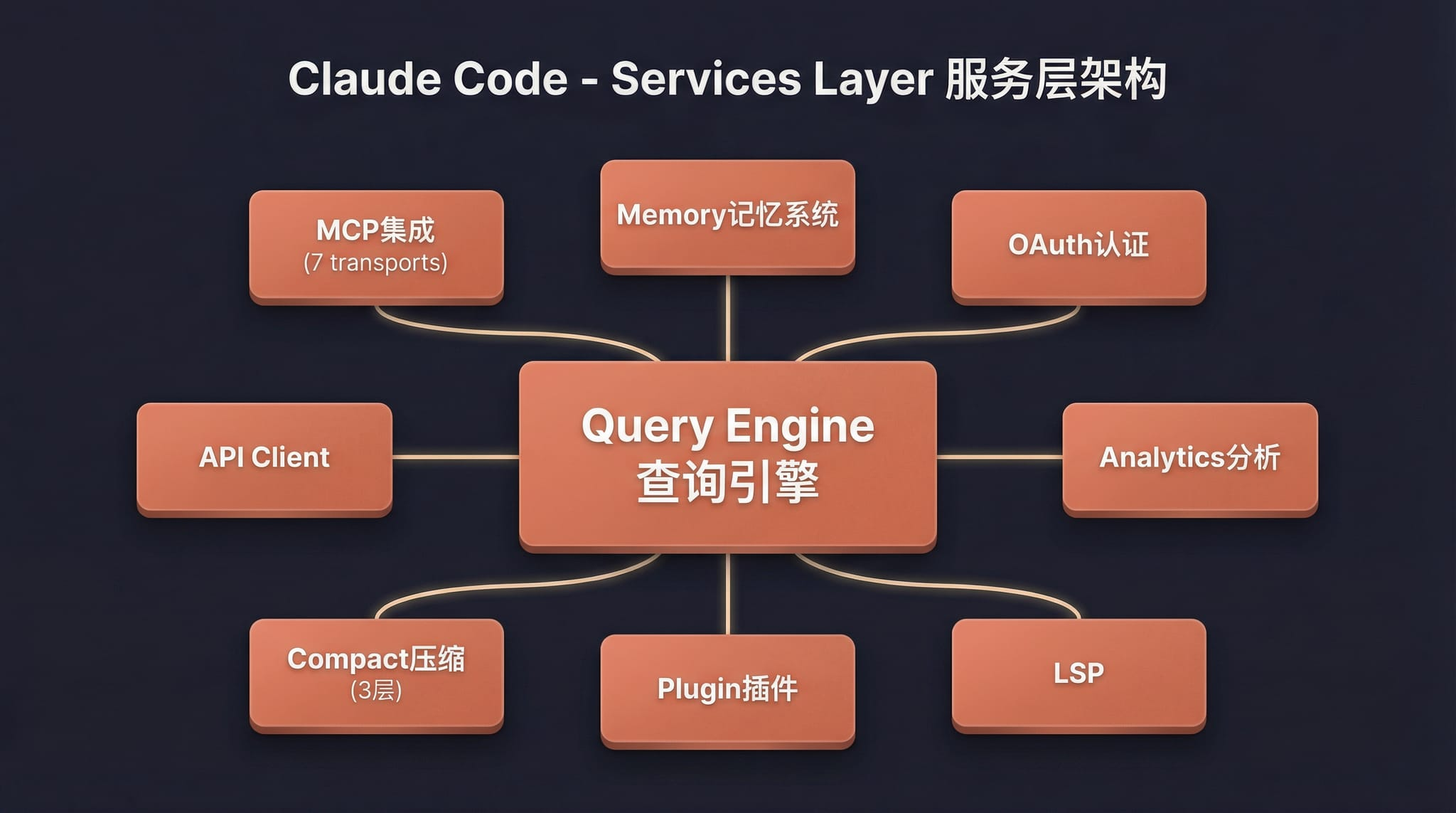 Services layer |
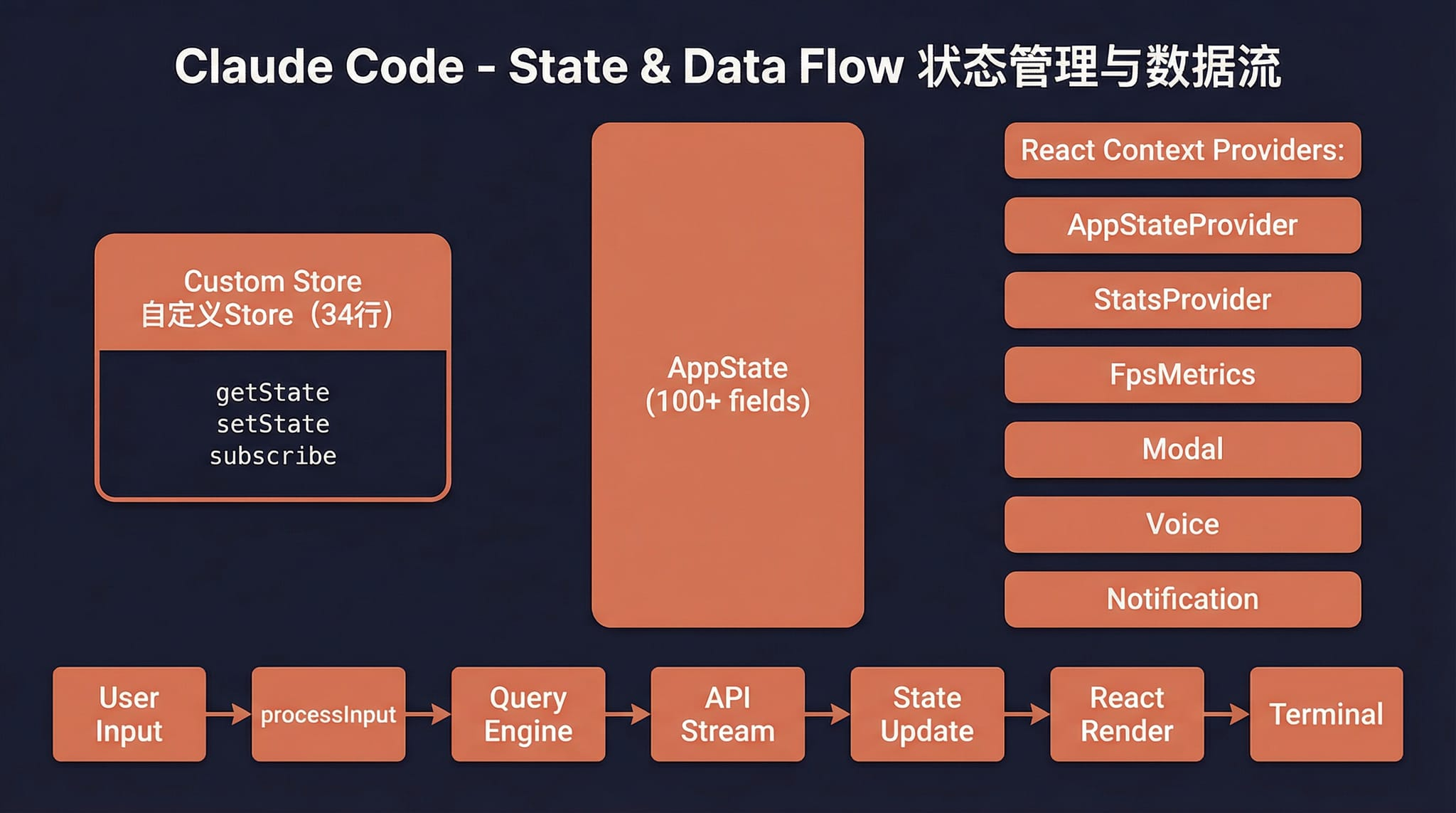 State and data flow |
Quick Start
1. Install Bun
# macOS / Linux
curl -fsSL https://bun.sh/install | bash

# macOS (Homebrew)
brew install bun

# Windows (PowerShell)
powershell -c "irm bun.sh/install.ps1 | iex"
On minimal Linux images, if you see
unzip is required, runapt update && apt install -y unzipfirst.
2. Install Dependencies and Configure
bun install
cp .env.example .env
# Edit .env with your API key — see docs/en/guide/env-vars.md for details
3. Start
macOS / Linux
./bin/claude-haha                          # Interactive TUI mode
./bin/claude-haha -p "your prompt here"    # Headless mode
./bin/claude-haha --help                   # Show all options
Windows
Prerequisite: Git for Windows must be installed.
# PowerShell / cmd — call Bun directly
bun --env-file=.env ./src/entrypoints/cli.tsx

# Or run inside Git Bash
./bin/claude-haha
4. Global Usage (Optional)
Add bin/ to your PATH to run from any directory. See Global Usage Guide:
export PATH="$HOME/path/to/claude-code-haha/bin:$PATH"
5. Desktop Development
If you are developing or testing the desktop/ frontend, start both the API server and the desktop frontend.
5.1 Start the API server
cd /Users/nanmi/workspace/myself_code/claude-code-haha
SERVER_PORT=3456 bun run src/server/index.ts
Optional health check:
curl http://127.0.0.1:3456/health
5.2 Start the desktop frontend
cd /Users/nanmi/workspace/myself_code/claude-code-haha/desktop
bun run dev --host 127.0.0.1 --port 2024
Then open:
http://127.0.0.1:2024
5.3 Notes
- If port
3456is already occupied by an old server process, runlsof -nP -iTCP:3456 -sTCP:LISTEN, find the PID, thenkill <PID>. - For chat testing, create a fresh session and re-select a real working directory.
- If an old session points to a deleted directory, the server will return
Working directory does not exist. That is separate from whether the API server is running.
Tech Stack
| Category | Technology |
|---|---|
| Runtime | Bun |
| Language | TypeScript |
| Terminal UI | React + Ink |
| CLI parsing | Commander.js |
| API | Anthropic SDK |
| Protocols | MCP, LSP |
More Documentation
| Document | Description |
|---|---|
| Environment Variables | Full env var reference and configuration methods |
| Third-Party Models | Using OpenAI / DeepSeek / Ollama and other non-Anthropic models |
| Memory System | Cross-session persistent memory usage and implementation |
| Multi-Agent System | Agent orchestration, parallel tasks and Teams collaboration |
| Skills System | Extensible capability plugins, custom workflows and conditional activation |
| Channel System | Remote Agent control via Telegram/Feishu/Discord IM platforms |
| Computer Use | Desktop control (screenshots, mouse, keyboard) — Architecture |
| Global Usage | Run claude-haha from any directory |
| FAQ | Common error troubleshooting |
| Source Fixes | Fixes compared with the original leaked source |
| Project Structure | Code directory structure |
Disclaimer
This repository is based on the Claude Code source leaked from the Anthropic npm registry on 2026-03-31. All original source code copyrights belong to Anthropic. It is provided for learning and research purposes only.