 773a8a703f
The desktop model picker now stores a session-scoped provider/model selection instead of relying on the global active provider. That selection is replayed on connect, passed into the CLI startup path, and preserved across turns until the user changes it again.

To make that true end-to-end, the server now restarts the session process when runtime selection changes, injects provider-scoped env for third-party providers, and routes proxy traffic by provider id. The selector UI was also tightened so provider grouping stays visible while the actual model choice remains readable.

Constraint: Different providers can expose the same model id, so chat runtime selection cannot be derived from model id alone
Constraint: A desktop session reuses one CLI subprocess across turns, so runtime changes must restart that process to take effect
Rejected: Keep using Settings active provider as the chat selector | conflates defaults with live session state and breaks overlapping models
Rejected: UI-only runtime switching without server restart | later turns would continue using the old CLI subprocess configuration
Confidence: high
Scope-risk: moderate
Reversibility: clean
Directive: Keep provider defaults and session runtime overrides separate, and preserve provider-scoped proxy routing when extending model selection surfaces
Tested: cd desktop && bun run lint
Tested: cd desktop && bun run test src/stores/chatStore.test.ts
Tested: cd desktop && bun run test src/__tests__/generalSettings.test.tsx
Tested: bun test src/server/__tests__/conversation-service.test.ts
Tested: bun test src/server/__tests__/conversations.test.ts
Tested: bun -e "await import('./src/server/services/titleService.ts'); await import('./src/server/ws/handler.ts')"
Not-tested: Real third-party provider round-trip from the desktop UI against a live upstream account
Claude Code Haha







A locally runnable version repaired from the leaked Claude Code source, with support for any Anthropic-compatible API endpoint (MiniMax, OpenRouter, etc.). Beyond the full TUI, we've also completed Computer Use (macOS / Windows), built a GUI desktop app, and enabled full remote control via Telegram / Feishu.
Features · Desktop · Architecture · Quick Start · Env Vars · FAQ · Global Usage · More Docs
Features
- Full Ink TUI experience (matching the official Claude Code interface)
--printheadless mode for scripts and CI- MCP server, plugin, and Skills support
- Custom API endpoint and model support (Third-Party Models Guide)
- Memory System (cross-session persistent memory) — Usage Guide
- Multi-Agent System (agent orchestration, parallel tasks, Teams collaboration) — Usage Guide | Implementation
- Skills System (extensible capability plugins, custom workflows) — Usage Guide | Implementation
- Channel System (remote Agent control via Telegram/Feishu/Discord IM platforms) — Architecture
- Computer Use desktop control — Guide | Architecture
- Desktop App (Tauri 2 + React GUI client, multi-tab multi-session) — Docs
- Fallback Recovery CLI mode (
CLAUDE_CODE_FORCE_RECOVERY_CLI=1 ./bin/claude-haha)
Architecture Overview
 Overall architecture |
 Request lifecycle |
 Tool system |
 Multi-agent architecture |
 Terminal UI |
 Permissions and security |
 Services layer |
 State and data flow |
Desktop Preview


 Main Interface |
 Code Editing & Diff View |
 Permission Control & AI Questions |
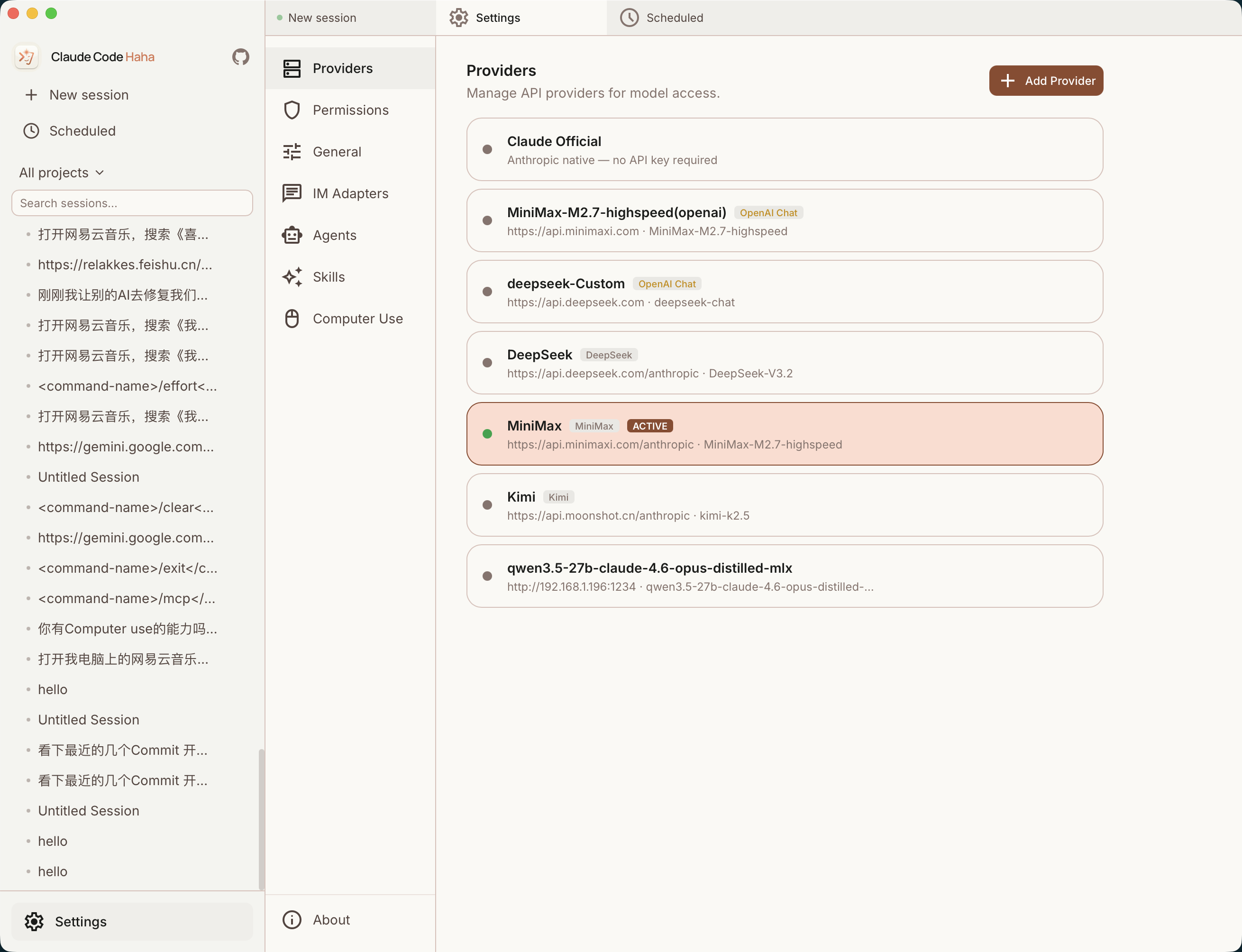 Multi-Provider Management |
 Scheduled Tasks |
 IM Adapters (Telegram / Feishu) |
Quick Start
1. Install Bun
# macOS / Linux
curl -fsSL https://bun.sh/install | bash

# macOS (Homebrew)
brew install bun

# Windows (PowerShell)
powershell -c "irm bun.sh/install.ps1 | iex"
On minimal Linux images, if you see
unzip is required, runapt update && apt install -y unzipfirst.
2. Install Dependencies and Configure
bun install
cp .env.example .env
# Edit .env with your API key — see docs/en/guide/env-vars.md for details
3. Start
macOS / Linux
./bin/claude-haha                          # Interactive TUI mode
./bin/claude-haha -p "your prompt here"    # Headless mode
./bin/claude-haha --help                   # Show all options
Windows
Prerequisite: Git for Windows must be installed.
# PowerShell / cmd — call Bun directly
bun --env-file=.env ./src/entrypoints/cli.tsx

# Or run inside Git Bash
./bin/claude-haha
4. Global Usage (Optional)
Add bin/ to your PATH to run from any directory. See Global Usage Guide:
export PATH="$HOME/path/to/claude-code-haha/bin:$PATH"
5. Desktop Development
If you are developing or testing the desktop/ frontend, start both the API server and the desktop frontend.
5.1 Start the API server
cd /Users/nanmi/workspace/myself_code/claude-code-haha
SERVER_PORT=3456 bun run src/server/index.ts
Optional health check:
curl http://127.0.0.1:3456/health
5.2 Start the desktop frontend
cd /Users/nanmi/workspace/myself_code/claude-code-haha/desktop
bun run dev --host 127.0.0.1 --port 2024
Then open:
http://127.0.0.1:2024
5.3 Notes
- If port
3456is already occupied by an old server process, runlsof -nP -iTCP:3456 -sTCP:LISTEN, find the PID, thenkill <PID>. - For chat testing, create a fresh session and re-select a real working directory.
- If an old session points to a deleted directory, the server will return
Working directory does not exist. That is separate from whether the API server is running.
Tech Stack
| Category | Technology |
|---|---|
| Runtime | Bun |
| Language | TypeScript |
| Terminal UI | React + Ink |
| CLI parsing | Commander.js |
| API | Anthropic SDK |
| Protocols | MCP, LSP |
More Documentation
| Document | Description |
|---|---|
| Environment Variables | Full env var reference and configuration methods |
| Third-Party Models | Using OpenAI / DeepSeek / Ollama and other non-Anthropic models |
| Memory System | Cross-session persistent memory usage and implementation |
| Multi-Agent System | Agent orchestration, parallel tasks and Teams collaboration |
| Skills System | Extensible capability plugins, custom workflows and conditional activation |
| Channel System | Remote Agent control via Telegram/Feishu/Discord IM platforms |
| Computer Use | Desktop control (screenshots, mouse, keyboard) — Architecture |
| Desktop App | Tauri 2 + React GUI client — Quick Start | Architecture | Installation |
| Global Usage | Run claude-haha from any directory |
| FAQ | Common error troubleshooting |
| Source Fixes | Fixes compared with the original leaked source |
| Project Structure | Code directory structure |
Sponsorship & Partnership
This project is maintained in the author's spare time. Corporate or individual sponsorships are welcome to support ongoing development. Custom features, integrations, and business partnerships are also open for discussion.
📧 Contact: relakkes@gmail.com
☕ Buy Me a Coffee
If this project helps you, consider buying me a coffee — every bit of support keeps this project going ❤️
 WeChat Pay |
 Alipay |

Buy Me a Coffee |
Disclaimer
This repository is based on the Claude Code source leaked from the Anthropic npm registry on 2026-03-31. All original source code copyrights belong to Anthropic. It is provided for learning and research purposes only.