# Claude Code Skills System -- Usage Guide
> Skills are the extensible capability engine of Claude Code, allowing you to define custom automated workflows using Markdown files.
What Are Skills · Six Sources · Definition Format · Invocation · Execution Context · Conditional Activation · Permissions · Quick Reference
---
## 1. What Are Skills?
Skills are Claude Code's **extensible capability plugin system**. Each Skill is a Markdown file (with YAML frontmatter) that defines a specialized prompt and behavioral configuration, enabling Claude to execute professional workflows in specific scenarios.
Core capabilities:
| Capability | Description |
|------------|-------------|
| Specialized Workflows | Define standard processes for code review, TDD, debugging, etc. |
| Tool Permission Control | Restrict a Skill to only use specified tools |
| Model Switching | Assign different models to different Skills |
| Execution Isolation | Fork mode runs in an isolated sub-agent |
| Conditional Activation | Activate only when specific files are being operated on |
| Hook Injection | Automatically register lifecycle hooks when a Skill is invoked |
---
## 2. Six Skill Sources

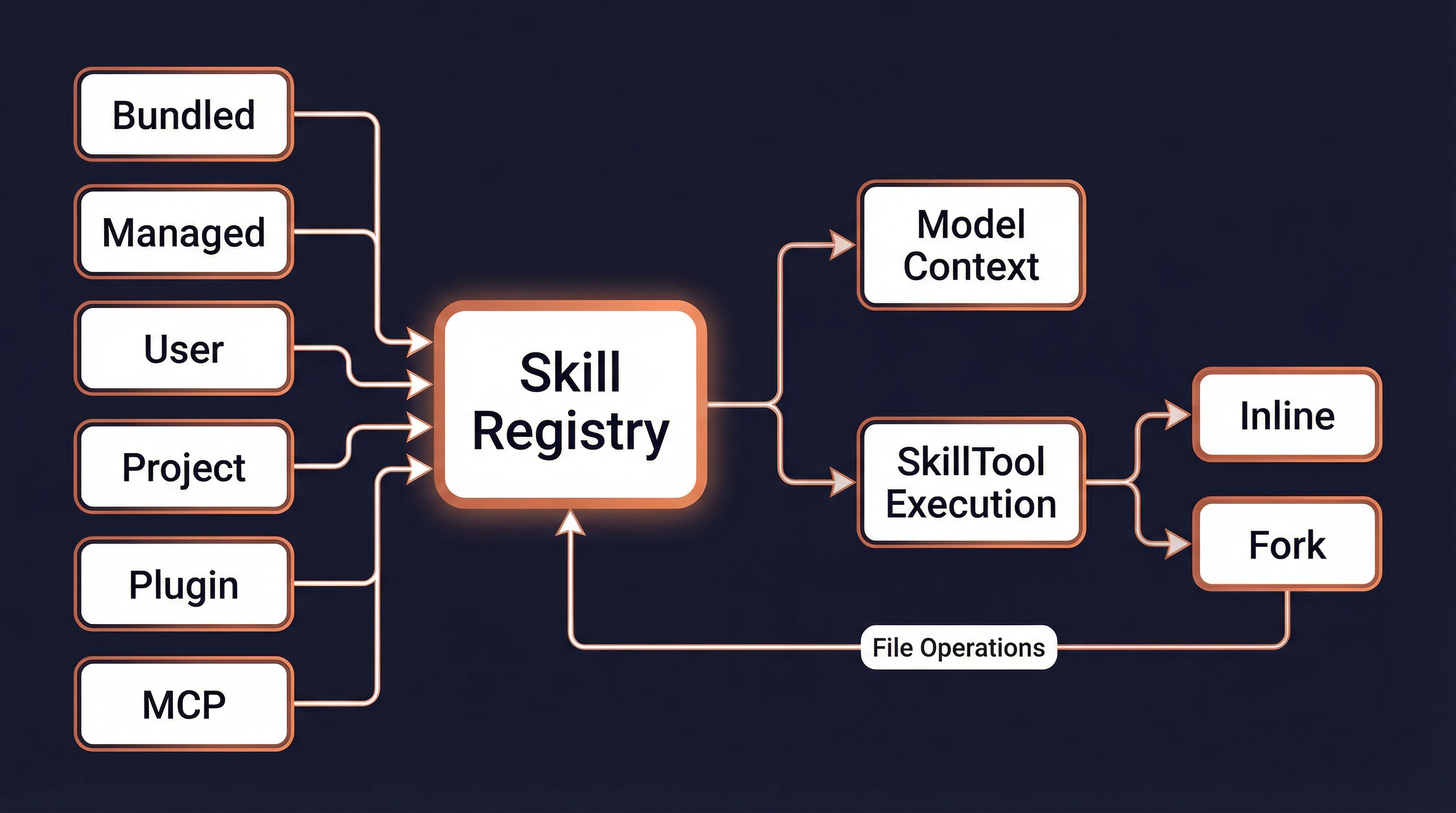
Claude Code loads Skills from 6 different sources, ordered by priority from highest to lowest:
### 1. Bundled (Built-in Skills)
Compiled into the CLI binary and available to all users. Defined in TypeScript and registered via `registerBundledSkill()`.
**Current Built-in Skills:**
| Skill | Description | Special Conditions |
|-------|-------------|--------------------|
| `/verify` | Verify code changes | -- |
| `/debug` | Debugging assistant | -- |
| `/simplify` | Code simplification review | -- |
| `/remember` | Memory management | Requires auto-memory enabled |
| `/batch` | Batch processing | -- |
| `/stuck` | Help when stuck | -- |
| `/skillify` | Create a new Skill | -- |
| `/keybindings` | Custom keyboard shortcuts | -- |
| `/loop` | Timed loop tasks | AGENT_TRIGGERS feature gate |
| `/schedule` | Remote agent scheduling | AGENT_TRIGGERS_REMOTE feature gate |
| `/claude-api` | Claude API integration | BUILDING_CLAUDE_APPS feature gate |
| `/dream` | Automatic memory organization | KAIROS feature gate |
### 2. Managed (Policy-Managed Skills)
Controlled by organizational policies, stored in `/.claude/skills/`. Suitable for enterprise deployments.
### 3. User (User Skills)
Defined by individual users, stored in `~/.claude/skills/`.
```
~/.claude/skills/
├── my-review/
│ └── SKILL.md ← Main Skill file
├── deploy-check/
│ └── SKILL.md
└── ...
```
### 4. Project (Project Skills)
Defined at the project level, stored in `.claude/skills/`. Can be committed to version control.
```
your-project/
└── .claude/
└── skills/
├── lint-fix/
│ └── SKILL.md
└── test-runner/
└── SKILL.md
```
### 5. Plugin (Plugin Skills)
Provided by installed plugins. Plugins declare Skills directories via `skillsPath` / `skillsPaths` in their manifest.
Naming format: `{pluginName}:{skillName}`
```
Examples: superpowers:code-reviewer
superpowers:brainstorming
```
### 6. MCP (MCP Server Skills)
Provided by connected MCP servers, naming format: `mcp__server-name__prompt-name`.
**Security restriction**: MCP Skills are from remote untrusted sources and are **prohibited from executing** `!`...`` inline shell commands.
---
## 3. Skill Definition Format
### Directory Structure
Each Skill is a directory containing a `SKILL.md` file:
```
skill-name/
└── SKILL.md ← Filename must be SKILL.md (case-insensitive)
```
### Complete Frontmatter Fields
```yaml
---
name: My Skill # Display name (optional, defaults to directory name)
description: What this skill does # Description (required; auto-extracted from content if missing)
when_to_use: When to use this skill # Usage scenario description (optional)
version: 1.0.0 # Version number (optional)
# ── Invocation Control ──
user-invocable: true # Whether user can invoke via /skill-name (default: true)
disable-model-invocation: false # Prevent model from invoking via Skill tool (optional)
argument-hint: "" # Argument hint (optional)
# ── Execution Configuration ──
context: inline # Execution context: inline (default) or fork (sub-agent)
agent: general-purpose # Agent type when forked (optional)
model: sonnet # Model override: haiku / sonnet / opus / inherit (optional)
effort: high # Thinking effort: low / medium / high / max (optional)
allowed-tools: "Bash, Read" # Allowed tools (comma-separated or YAML list)
shell: bash # Shell type: bash (default) or powershell
# ── Conditional Activation ──
paths: "src/**/*.ts, test/**/*.ts" # Glob patterns; activate only when matching files are operated on
# ── Lifecycle Hooks ──
hooks:
PreToolUse:
- matcher: "Bash"
hooks:
- command: "echo 'Before bash'"
once: true # Execute only once
---
# Skill Body Content
This is the Markdown-formatted prompt that Claude sees when this Skill is invoked.
Supported special syntax:
- `${CLAUDE_SKILL_DIR}` — Expands to the Skill's directory
- `${CLAUDE_SESSION_ID}` — Expands to the current session ID
- `$ARGUMENTS` / `${ARG1}` — Argument substitution
- !`shell command` — Inline shell command execution
```
### Frontmatter Field Reference
| Field | Type | Default | Description |
|-------|------|---------|-------------|
| `name` | string | Directory name | Display name override |
| `description` | string | Auto-extracted | Brief Skill description |
| `when_to_use` | string | -- | Usage scenario description |
| `user-invocable` | boolean | true | Whether user can invoke via /name |
| `disable-model-invocation` | boolean | false | Prevent model invocation |
| `context` | `inline` \| `fork` | inline | Execution context |
| `agent` | string | general-purpose | Agent type when forked |
| `model` | string | Inherited | Model override (haiku/sonnet/opus) |
| `effort` | string \| int | -- | Thinking effort level |
| `allowed-tools` | string \| list | All | Allowed tools whitelist |
| `paths` | string \| list | -- | Conditional activation glob patterns |
| `shell` | `bash` \| `powershell` | bash | Shell command type |
| `hooks` | object | -- | Lifecycle hook configuration |
| `argument-hint` | string | -- | Argument hint text |
| `version` | string | -- | Version number |
---
## 4. Invocation Methods

### Method 1: User Slash Commands
Type `/skill-name` directly in the terminal:
```
> /commit
> /review-pr 123
> /verify
```
**Prerequisite**: The Skill's `user-invocable` must be `true`.
### Method 2: Automatic Model Invocation
When Claude identifies a suitable Skill during conversation, it automatically invokes it via SkillTool:
```
User: Please review this code for me
Claude: [Invokes superpowers:code-reviewer via SkillTool]
```
**Prerequisite**: The Skill's `disable-model-invocation` must not be `true`.
### Method 3: Nested Invocation
One Skill can trigger another during execution:
```
/verify → internally invokes → /simplify
```
Tracked in telemetry via `invocation_trigger: 'nested-skill'`.
### Invocation Priority
When Skills with the same name exist in multiple sources, they are resolved in the following order (first match wins):
```
1. Bundled (built-in) ← Highest priority
2. Built-in Plugin
3. Skill Dirs (user/project directories)
4. Workflow Commands
5. Plugin Commands
6. Plugin Skills
7. Built-in Commands ← Lowest priority
```
---
## 5. Execution Context
### Inline Mode (Default)
Skill content is **expanded into the current conversation**. Claude directly sees the prompt and executes within the same context.
```yaml
context: inline # Default value, can be omitted
```
**Characteristics:**
- Shares the parent conversation's token budget
- Can access conversation history context
- `allowedTools` restricts available tools for the current turn
- `model` overrides the model used for the current turn
### Fork Mode (Sub-Agent)
The Skill runs in an **isolated sub-agent** with its own independent token budget and context.
```yaml
context: fork
agent: general-purpose # Optional, specifies agent type
```
**Characteristics:**
- Independent token budget; does not consume the parent conversation's quota
- Isolated conversation context
- Can specify a different agent type (e.g., `Bash`, `general-purpose`)
- Results are extracted and returned to the parent conversation upon completion
- Supports progress reporting (`onProgress` callback)
### Comparison of Both Modes
| Feature | Inline | Fork |
|---------|--------|------|
| Token Budget | Shared with parent | Independent budget |
| Context Access | Full conversation history | Skill prompt only |
| Result Return | Directly in conversation | Text extracted into tool_result |
| Use Cases | Brief guidance, extended context | Long tasks, independent computation |
| Tool Restrictions | contextModifier modification | modifiedGetAppState |
---
## 6. Conditional Activation
Skills can use the `paths` frontmatter to implement **on-demand activation**, becoming visible to the model only when matching files are operated on.
### Configuration
```yaml
---
name: TypeScript Fix
description: Fix TypeScript type errors
paths: "src/**/*.ts, test/**/*.ts"
---
```
### How It Works
```
1. All Skills are loaded at startup
2. Skills with paths are stored in the conditionalSkills Map (not exposed to the model)
3. When the user operates on a file (Read/Write/Edit)
4. activateConditionalSkillsForPaths() matches using the ignore library
5. On match → moved to the dynamicSkills Map → visible to model
6. Once activated, remains active for the entire session
```
### Dynamic Discovery
In addition to conditional activation, Skills also support **runtime discovery**:
```
1. User operates on a file in a deeply nested directory
2. discoverSkillDirsForPaths() traverses upward from the file path
3. Looks for .claude/skills/ directories (not beyond cwd)
4. Skips directories ignored by .gitignore
5. New directory found → addSkillDirectories() → load and register
```
---
## 7. Permission Control
### Auto-Allow
If a Skill contains only "safe properties" (no `allowedTools`, no `hooks`, no `fork`), it is **automatically approved** for execution without user confirmation.
### Manual Confirmation
Skills with tool restrictions, hooks, or fork execution will prompt the user on first invocation:
```
Execute skill: my-custom-skill
Allow? (y)es / (n)o / (a)lways allow / (d)eny
```
### Permission Rules
| Rule Type | Format | Description |
|-----------|--------|-------------|
| Exact Allow | `Skill:commit` | Allow execution of the commit Skill |
| Prefix Allow | `Skill:review:*` | Allow all Skills with the review: prefix |
| Exact Deny | `Skill:dangerous` set to deny | Deny execution |
| Prefix Deny | `Skill:untrusted:*` set to deny | Deny all Skills with the untrusted: prefix |
**Processing order:** Deny rules → Allow rules → Safe property check → Ask user
---
## 8. Quick Reference
### Creating a Skill
```bash
# 1. Create directory
mkdir -p ~/.claude/skills/my-skill
# 2. Create SKILL.md
cat > ~/.claude/skills/my-skill/SKILL.md << 'EOF'
---
name: My Skill
description: An example Skill
user-invocable: true
---
# Skill Content
Hello, this is my custom Skill.
EOF
```
### Common Operations
| Operation | Method |
|-----------|--------|
| Create a Skill | `~/.claude/skills//SKILL.md` |
| Project-level Skill | `.claude/skills//SKILL.md` |
| Invoke a Skill | Type `/skill-name` in terminal |
| View available Skills | Type `/skills` in terminal |
| Create Skill with AI | `/skillify` |
| Restrict tools | Add `allowed-tools` in frontmatter |
| Fork execution | Add `context: fork` in frontmatter |
| Conditional activation | Add `paths: "src/**"` in frontmatter |
### Skill Availability Matrix
| Source | User Invocable | Model Invocable | Supports Fork | Supports Hooks |
|--------|---------------|-----------------|---------------|----------------|
| Bundled | Per definition | Per definition | Yes | Yes |
| Managed | Yes | Yes | Yes | Yes |
| User | Yes (default) | Yes | Yes | Yes |
| Project | Yes (default) | Yes | Yes | Yes |
| Plugin | Per config | Per config | Yes | Yes |
| MCP | Per config | Per config | Yes | No (security restriction) |