# Claude Code Agent Framework Deep Dive
> Deconstructing the architecture behind the world's most popular AI code editor — from source code to design philosophy.
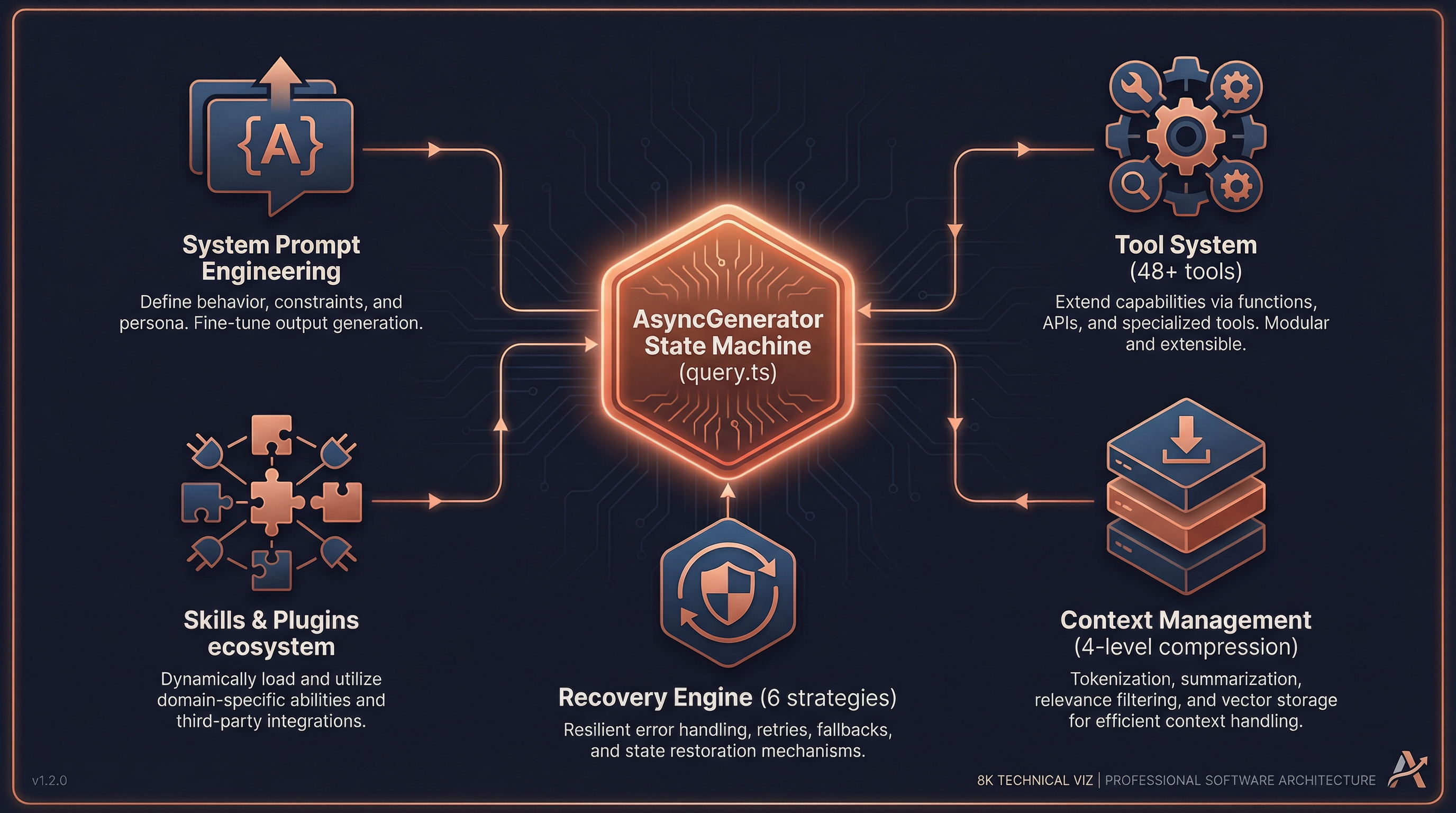
Core Loop · Prompt Engineering · Tool System · Context Management · Skills & Plugins · Permissions · Recovery · vs LangChain · Why It Works
---
## Preface: A Fundamental Question
If you observe Claude Code closely, you'll notice some remarkable behaviors:
- It can modify dozens of files in a single conversation with extremely few errors
- It automatically recovers from edge cases (token overflow, API timeouts, tool failures)
- It can simultaneously manage multiple subagents collaborating on complex tasks
- Long conversations don't degrade — they actually become more precise over time
Behind these capabilities lies a carefully engineered Agent framework. This document deconstructs that framework from the source code level, revealing its core design philosophy.
---
## 1. The Core Agent Loop
### 1.1 Not ReAct — An Async Generator State Machine
Most agent frameworks (including LangChain) adopt the classic **ReAct** pattern:
```
Thought → Action → Observation → Thought → ...
```
Claude Code does **not** use this pattern. Its core is an **async generator-driven state machine**, defined in `src/query.ts` (~1730 lines):
```typescript
// src/query.ts:219
export async function* query(params: QueryParams): AsyncGenerator<...>
```
This function is the heart of the entire agent. It's not a simple "think-act-observe" loop but a **streaming state machine** that yields messages in real-time and drives iteration through state assignment (not recursive calls).
### 1.2 The State Structure
```typescript
// src/query.ts:204-217
type State = {
messages: Message[] // Full conversation history
toolUseContext: ToolUseContext // Tool execution context
autoCompactTracking: AutoCompactTracking // Auto-compaction tracking
maxOutputTokensRecoveryCount: number // Output recovery counter
hasAttemptedReactiveCompact: boolean // Whether reactive compact was tried
maxOutputTokensOverride: number // Output token override
pendingToolUseSummary: Promise<...> // Pending tool summary
stopHookActive: boolean // Stop hook state
turnCount: number // Conversation turn count
transition: Continue | undefined // Transition reason
}
```
### 1.3 Five Phases of the Core Loop
The entire `while (true)` loop (`src/query.ts:307-1728`) consists of five phases:
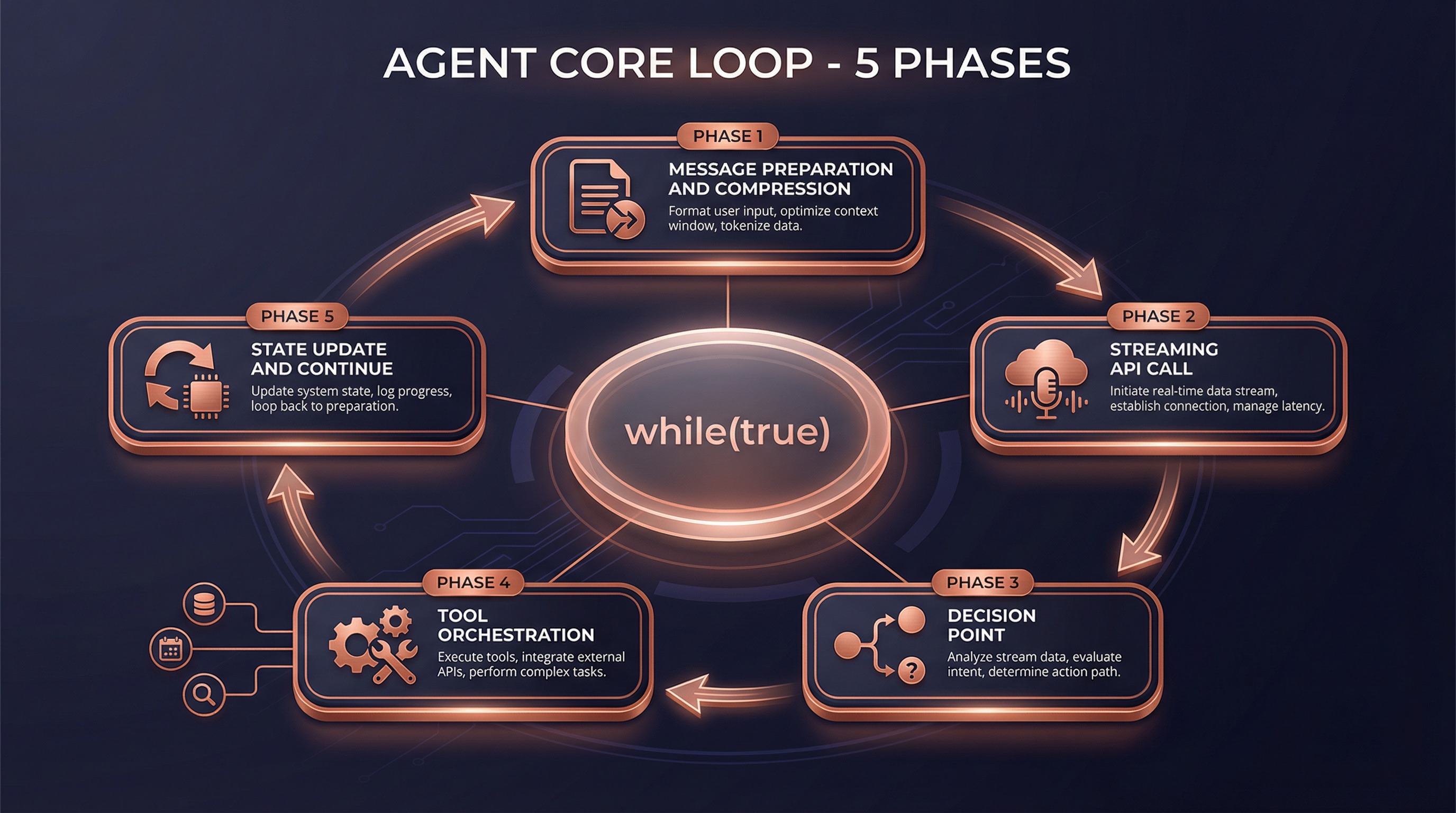
#### Phase 1: Message Preparation & Smart Compression (lines 365-543)
Before calling the API, conversation history goes through four layers of compression:
| Compression Strategy | Mechanism | Trigger |
|---------------------|-----------|---------|
| **Snip Compression** | Smart deletion of redundant tokens in old messages | Every turn |
| **Micro Compression** | In-place modification of cached message content | Every turn |
| **Context Collapse** | Staged summarization of historical messages | When context nears limit |
| **Auto Compact** | Full summary generation via Claude | When context is critically low |
This is the key to Claude Code handling **extremely long conversations** without degradation — it doesn't simply truncate history, but **intelligently compresses while preserving critical information**.
#### Phase 2: Streaming API Call (lines 652-954)
```typescript
// src/query.ts:659-708
for await (const message of deps.callModel({
messages: prependUserContext(messagesForQuery, userContext),
systemPrompt: fullSystemPrompt,
thinkingConfig,
tools: toolUseContext.options.tools,
signal: abortController.signal,
}))
```
Key design: **tools begin executing during streaming**, not after the model generates a complete response. This is achieved through `StreamingToolExecutor` — when the model generates `tool_use` blocks, tools start running immediately.
#### Phase 3: Decision Point (lines 1062-1358)
```
Model response complete
│
├─ Has tool calls? ──→ Continue loop (Phase 4)
│
└─ No tool calls? ──→ Run stop hooks → Check token budget → Return result
```
#### Phase 4: Tool Orchestration (lines 1363-1409)
Tool execution isn't simple sequential invocation — it uses a carefully designed **orchestration strategy** (`src/services/tools/toolOrchestration.ts`):
```
Tool call list
│
├─ Partition: read-only vs. write
│
├─ Read-only tools ──→ Parallel execution (up to 10 concurrent)
│
└─ Write tools ──→ Serial execution (prevent race conditions)
```
#### Phase 5: State Update & Loop (lines 1704-1728)
This is the most elegant part of the design — **driving the loop through state assignment rather than recursive calls**:
```typescript
// src/query.ts:1715-1728
const next: State = {
messages: [...messagesForQuery, ...assistantMessages, ...toolResults],
toolUseContext: toolUseContextWithQueryTracking,
autoCompactTracking: tracking,
turnCount: nextTurnCount,
transition: { reason: 'next_turn' },
}
state = next
// Back to top of while(true) loop
```
No recursion, no callback hell — just simple `state = next` followed by `continue`. This guarantees:
- **Memory stability**: No stack overflow from deep recursion
- **State traceability**: Every transition reason is recorded
- **Controllable recovery**: Errors at any phase can be recovered by modifying state
---
## 2. System Prompt Engineering
### 2.1 Layered Construction Architecture
The system prompt isn't a static string — it's dynamically assembled through a **layered pipeline** (`src/constants/prompts.ts:444-577`):

```
┌─────────────────────────────────────────────────────────────┐
│ Static Cacheable Zone │
│ ┌───────────────────────────────────────────────────────┐ │
│ │ Role Def │ System Rules │ Task Guide │ Tool Desc │ Style│ │
│ └───────────────────────────────────────────────────────┘ │
├─────────────────────── Cache Boundary ──────────────────────┤
│ Dynamic Variable Zone │
│ ┌───────────────────────────────────────────────────────┐ │
│ │ Session Guide │ Memory │ Env Info │ MCP Instr │ Budget │ │
│ └───────────────────────────────────────────────────────┘ │
└─────────────────────────────────────────────────────────────┘
```
The **cache boundary (`SYSTEM_PROMPT_DYNAMIC_BOUNDARY`)** is a critical design element:
- **Above the boundary**: Content universal across users and organizations, cached with `scope: 'global'`
- **Below the boundary**: User/session-specific content, cached with `scope: 'ephemeral'`
This means Claude Code's system prompt **doesn't need to be reprocessed every time** — the static portion is shared globally, dramatically reducing latency and cost.
### 2.2 Two Section Types
```typescript
// src/constants/systemPromptSections.ts
// Type 1: Cached Section (computed once, reused for entire session)
systemPromptSection('memory', async () => {
return buildMemoryLines() // Load CLAUDE.md, memory files, etc.
})
// Type 2: Cache-Breaking Section (recomputed every turn)
DANGEROUS_uncachedSystemPromptSection('mcp_instructions', async () => {
return getMcpInstructions() // MCP servers may connect/disconnect mid-session
}, 'MCP servers can connect/disconnect mid-session')
```
### 2.3 CLAUDE.md Loading Mechanism
CLAUDE.md is the custom instruction system, loaded by **priority from low to high** (`src/utils/claudemd.ts`):
```
/etc/claude-code/CLAUDE.md ← Global managed config (lowest priority)
↓
~/.claude/CLAUDE.md ← User-level global instructions
↓
project-root/CLAUDE.md ← Project-level instructions
project-root/.claude/CLAUDE.md
project-root/.claude/rules/*.md
↓
project-root/CLAUDE.local.md ← Local private instructions (highest priority)
```
Supports `@path` syntax for recursive file inclusion, with automatic circular reference prevention.
### 2.4 System Prompt Priority Resolution
The final system prompt is determined through `buildEffectiveSystemPrompt()` (`src/utils/systemPrompt.ts:41-123`):
1. **Override prompt** — Complete replacement (used in loop mode)
2. **Coordinator prompt** — Coordinator mode
3. **Agent prompt** — Custom agent definition
4. **Custom prompt** — `--system-prompt` CLI flag
5. **Default prompt** — Standard system prompt
6. **Append prompt** — Always appended at the end
---
## 3. Tool System Design
### 3.1 Tools: More Than Function Calls
Claude Code's tools aren't simple "name + params + execute". Each tool is a **complete lifecycle management unit** (`src/Tool.ts:362-695`):
```typescript
type Tool = {
// Identity
name: string
aliases?: string[] // Backward-compatible old names
searchHint?: string // ToolSearch keyword matching
// Capability declarations
isEnabled(): boolean
isConcurrencySafe(input): boolean // Can run in parallel?
isReadOnly(input): boolean // Read-only operation?
isDestructive(input): boolean // Destructive operation?
// Lifecycle
validateInput(input, context) // Input validation
checkPermissions(input, context) // Permission check
call(input, context, ...) // Actual execution
// Output & rendering
renderToolUseMessage(input) // Render invocation info
renderToolResultMessage(content) // Render result info
renderToolUseProgressMessage(...) // Render progress
mapToolResultToToolResultBlockParam() // Map to API format
// Smart features
inputSchema: Zod schema // Zod type validation
maxResultSizeChars: number // Result size threshold
toAutoClassifierInput(input) // Security classifier input
getToolUseSummary?(input): string // Tool usage summary
}
```
This design makes every tool **self-describing, self-validating, and self-rendering** — the framework doesn't need to understand tool internals, just call standard interfaces.
### 3.2 Tool Registration: Three-Stage Pipeline
Tool discovery and registration happens in three stages (`src/tools.ts`):
```
Stage 1: Base Tool Pool (getAllBaseTools)
│ ~48 built-in tools
│ + Feature-flag-gated conditional tools
│
Stage 2: Filtering (getTools)
│ Filter by permission mode
│ Filter by REPL mode
│ Filter by isEnabled()
│
Stage 3: MCP Merge (assembleToolPool)
+ Dynamic tools from MCP servers
Deduplication (built-in takes precedence)
Sorting (cache stability)
```
### 3.3 Tool Execution Pipeline
Each tool invocation passes through a **7-step pipeline** (`src/services/tools/toolExecution.ts`):
```
1. Tool Lookup → 2. Input Parsing (Zod) → 3. Custom Validation
│
4. Pre-Tool Hooks → 5. Permission Check → 6. Actual Execution → 7. Post-Tool Hooks
```
Each step can **interrupt, modify, or enhance** the execution flow. This isn't a simple `try { tool.call(input) } catch` — it's a full middleware pipeline.
### 3.4 Deferred Tool Loading
Claude Code has 48+ built-in tools. Sending all tool definitions to the model on every API call would waste massive tokens. The solution:
```typescript
// Tools can be marked for deferred loading
{
shouldDefer: true, // Only list name in ToolSearch
alwaysLoad: false, // Don't include full schema in initial prompt
searchHint: "notebook" // Search keywords
}
```
The model dynamically retrieves full definitions via the `ToolSearch` tool when needed. This dramatically reduces system prompt size.
---
## 4. Context Management & Compression
### 4.1 The Secret Behind Unlimited Conversations
Claude Code claims "conversations have no context limit." Behind this is a **four-level compression system**:
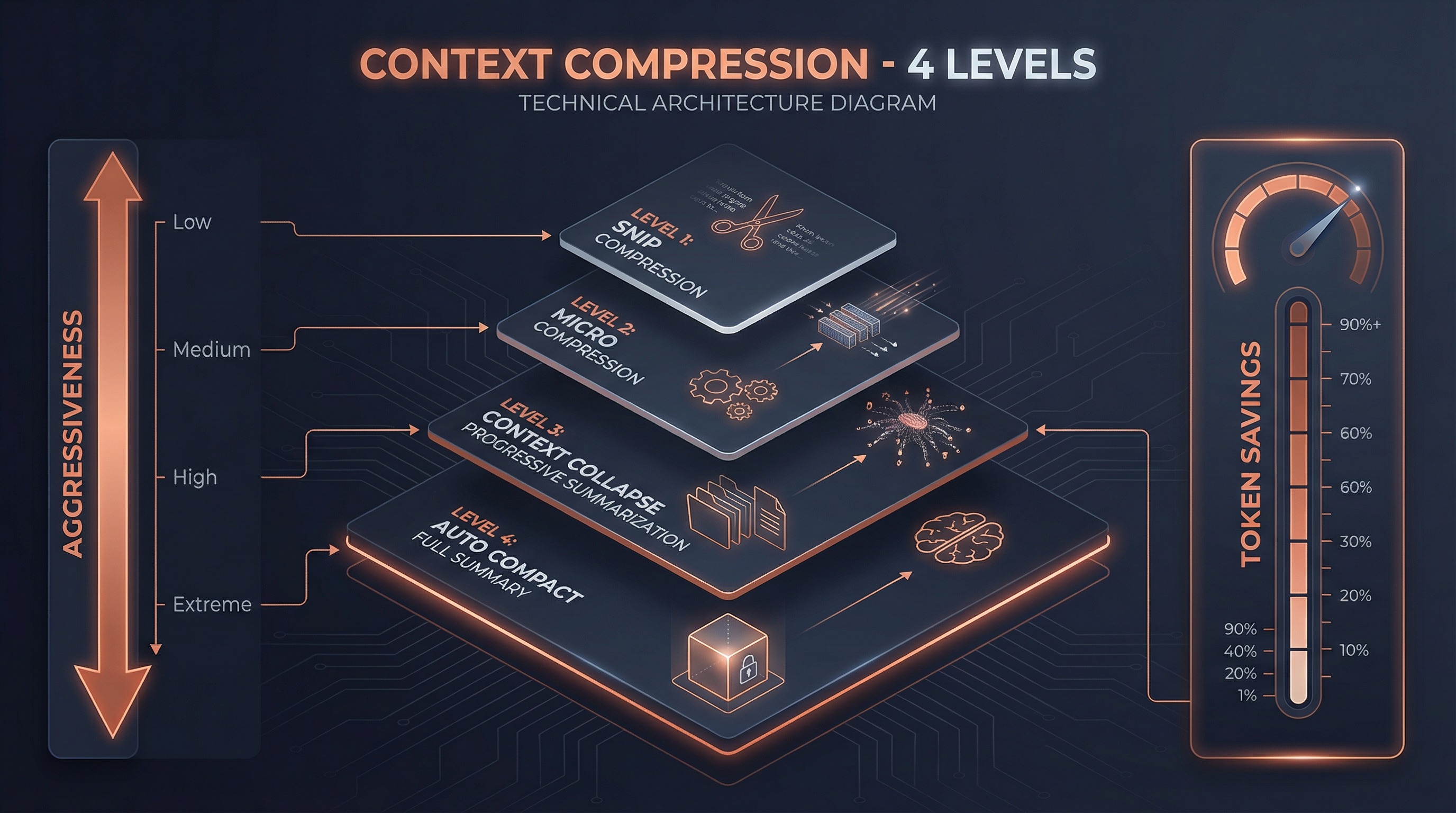
#### Level 1: Snip Compression
Smart trimming of processed messages — removes duplicate file content, overly long tool outputs, etc.
#### Level 2: Micro Compression
Modifies cached message content without changing the cache key. An "in-place optimization" strategy.
#### Level 3: Context Collapse
Staged summarization of historical messages. Not all-at-once summarization, but **progressive folding** — summarize the oldest messages first, keeping recent details intact.
#### Level 4: Auto Compact
When all local optimizations are insufficient, Claude itself generates a complete conversation summary that replaces all historical messages.
### 4.2 System Context Injection
Before every API call, two types of context are automatically injected (`src/context.ts`):
```typescript
// System context (memoized, cached for entire session)
getSystemContext() → {
gitStatus, // Current branch, recent commits, file status
cacheBreakerInjection // System-level injection
}
// User context (memoized, cleared when CLAUDE.md changes)
getUserContext() → {
claudeMdContent, // Merged content from all CLAUDE.md files
currentDate, // Current date
mcpInstructions // MCP server instructions
}
```
### 4.3 System Reminders
System reminders are special **attachment messages** injected into tool results or user messages (`src/utils/attachments.ts`):
```xml
System-level context information, unrelated to specific tool results.
```
Use cases include:
- Security warnings during file reads
- Memory staleness notifications
- Accompanying information for side questions
- Availability notices for deferred tools
---
## 5. Skills & Plugin Ecosystem
### 5.1 Skills System
Skills are one of Claude Code's most powerful extension mechanisms. They're not simple "command aliases" but **complete AI behavior definitions**.
#### Skill Definition Structure
```typescript
type BundledSkillDefinition = {
name: string
description: string
whenToUse?: string // Model auto-determines when to use
allowedTools?: string[] // Restrict tool pool
model?: string // Specify model
hooks?: HooksSettings // Lifecycle hooks
context?: 'inline' | 'fork' // Inline or independent context
agent?: string // Associated agent type
getPromptForCommand: (args, context) => Promise
}
```
#### Two Execution Contexts
| Context | Behavior | Use Case |
|---------|----------|----------|
| `inline` | Skill content expands directly into current conversation | Simple instructions, format templates |
| `fork` | Skill runs as a subagent in an independent context | Complex workflows, independent token budget |
#### Skill Discovery Sources
```
Bundled skills (bundled) ← Compiled into CLI, 15+
↓
Plugin skills (plugin) ← Plugin-registered
↓
User skills (~/.claude/skills/) ← User-global
↓
Project skills (.claude/skills/) ← Project-level
↓
Policy skills (policy) ← Organization-managed
```
### 5.2 Plugin System
Plugins are higher-level extension units that can contain **skills, hooks, MCP servers, and LSP servers**:
```typescript
type BuiltinPluginDefinition = {
name: string
description: string
skills?: BundledSkillDefinition[] // Skill collection
hooks?: HooksSettings // Lifecycle hooks
mcpServers?: Record // MCP servers
lspServers?: Record // LSP servers
isAvailable?: () => boolean // Availability check
defaultEnabled?: boolean // Default enabled state
}
```
The key plugin design: **users can toggle enable/disable**, unlike directly registered skills.
### 5.3 Hooks System
Hooks are **programmable interception points** across the entire lifecycle:
```
SessionStart → UserPromptSubmit → PreToolUse → [Tool Execution]
│ │
│ PostToolUse
│ │
└── SubagentStart ←── Stop ←── TaskCompleted ←─┘
│
SubagentStop → SessionEnd
```
Hooks execute as shell commands, with exit codes controlling behavior:
- **0**: Success, stdout content processed per event type
- **2**: stderr content shown to model or user
- **Other**: Shown to user only
### 5.4 MCP: Model Context Protocol
MCP is the standard protocol for Claude Code's interaction with the external world. Tool naming convention:
```
mcp__{normalized_server_name}__{tool_name}
e.g.: mcp__chrome_devtools__take_screenshot
```
Supported transports: `stdio`, `sse`, `http`, `websocket`, `sdk`
MCP tools are discovered at runtime and **seamlessly merged** into the unified tool pool alongside built-in tools.
---
## 6. Permission & Security Model
### 6.1 Layered Permission Model
```
┌─────────────────────────────────────┐
│ Permission Rules │
│ Sources: userSettings, project, │
│ flagSettings, policy │
├─────────────────────────────────────┤
│ Permission Modes │
│ default | plan | acceptEdits │
│ bypassPermissions | auto | bubble │
├─────────────────────────────────────┤
│ Hooks │
│ PreToolUse can intercept/modify │
├─────────────────────────────────────┤
│ Security Classifier │
│ ML model evaluates tool call safety│
└─────────────────────────────────────┘
```
### 6.2 Permission Decision Flow
Permission check for every tool invocation:
```typescript
type PermissionResult =
| { behavior: 'allow', updatedInput?, decisionReason }
| { behavior: 'ask', message, suggestions }
| { behavior: 'deny', message, decisionReason }
| { behavior: 'passthrough', message }
```
Decision reason traceability:
- `type: 'rule'` — Matched a permission rule
- `type: 'mode'` — Determined by permission mode
- `type: 'hook'` — Hook interception
- `type: 'classifier'` — ML classifier decision
### 6.3 Permission Rule Pattern Matching
```javascript
// Exact match
{ tool: 'Bash', behavior: 'deny' }
// Parameter pattern matching
{ tool: 'Bash(git *)', behavior: 'allow' } // Allow all git commands
{ tool: 'Bash(rm -rf *)', behavior: 'deny' } // Block rm -rf
// Wildcard
{ tool: 'File*', behavior: 'allow' } // Allow all File* tools
```
---
## 7. Fault Recovery Mechanisms
This is one of Claude Code's most sophisticated designs. The core loop in `src/query.ts` has **6 built-in recovery strategies**:
| Recovery Strategy | Trigger | Recovery Method |
|-------------------|---------|-----------------|
| `collapse_drain_retry` | Prompt too long | Drain staged context collapses, retry |
| `reactive_compact_retry` | Still too long | Generate summary via Claude, retry |
| `max_output_tokens_escalate` | Hit 8k default limit | Escalate to 64k limit, retry |
| `max_output_tokens_recovery` | Hit any limit | Inject "continue" nudge, retry (up to 3x) |
| `stop_hook_blocking` | Stop hook blocked | Inject blocking errors into context, retry |
| `token_budget_continuation` | Budget remaining | Inject budget nudge, continue |
Each recovery works by modifying `state`:
```typescript
// Example: prompt-too-long recovery
if (error.type === 'prompt_too_long') {
// Drain all staged collapses
const compacted = drainStagedCollapses(state.messages)
state = { ...state, messages: compacted, transition: { reason: 'collapse_drain_retry' } }
continue // Back to loop top to retry
}
```
### 7.1 Model Fallback
When the primary model's stream fails, the system:
1. Cleans up orphaned incomplete messages
2. Switches to a fallback model
3. Retries with the new model
### 7.2 Media Size Recovery
When images or other media cause token overflow:
- Triggers reactive compaction
- Automatically strips image content
- Retains text information and retries
---
## 8. How It Differs from LangChain/ReAct
### 8.1 Architecture Paradigm Comparison
| Dimension | LangChain | Claude Code |
|-----------|-----------|-------------|
| **Core Pattern** | ReAct (Think→Act→Observe) | Async Generator State Machine |
| **Execution Model** | Synchronous blocking | Streaming non-blocking |
| **Tool Execution** | After complete model response | During streaming |
| **State Management** | External Memory objects | Built-in state assignment + loop |
| **Error Recovery** | Manual orchestration required | 6 built-in recovery strategies |
| **Context Compression** | Simple truncation or summary | Four-level progressive compression |
| **Multi-Agent** | Chain/Graph explicit orchestration | Unified tool interface + state machine |
| **Extension Mechanisms** | Python class inheritance | Skills + Plugins + Hooks + MCP |
| **Caching Strategy** | None | Global / session / per-turn three-level cache |
### 8.2 Why Not ReAct?
The ReAct pattern has several inherent limitations:
1. **Serial bottleneck**: Each step must wait for the complete "think→act→observe" cycle
2. **No streaming capability**: Tools can't execute until the model completes its full response
3. **Recovery difficulty**: No unified state representation makes automatic recovery hard
4. **Cache-unfriendly**: Prompt structure changes significantly each cycle, making caching difficult
Claude Code's Async Generator pattern solves all these problems:
- **Streaming execution**: Tools run while the model generates
- **Controllable state**: The `State` object contains all needed info; recovery means just modifying state
- **Cache optimization**: Static prompts cached globally, dynamic parts minimized
- **Parallel capability**: Read-only tools auto-parallelize, write tools serialize for ordering
### 8.3 Specific Differences from LangChain Agents
```
LangChain Agent:
agent = initialize_agent(tools, llm, agent="zero-shot-react-description")
result = agent.run("do something")
# Internal: LLM → parse → tool → LLM → parse → tool → ... → final answer
# Each step is an independent LLM call
Claude Code Agent:
for await (const msg of query({ messages, tools, systemPrompt })) {
yield msg // Real-time message output
// Internal: streaming LLM → streaming tool execution → state update → continue
// A single API call can trigger multiple tools, which execute during streaming
}
```
Key differences:
- Each LangChain "step" is a complete LLM call
- Each Claude Code "turn" can include multiple tool calls, with tools executing during streaming
- LangChain requires an OutputParser to parse tool calls from model output
- Claude Code directly uses Anthropic API's native `tool_use` capability — no parsing needed
### 8.4 Comparison with LangGraph
LangGraph is LangChain's evolution, introducing graph structures:
| Dimension | LangGraph | Claude Code |
|-----------|-----------|-------------|
| **State Flow** | Explicit graph nodes + edges | Implicit state machine (while + continue) |
| **Visualization** | Exportable as graph | Transition reasons are traceable |
| **Persistence** | Checkpoint + State | File system + message history |
| **Human-in-Loop** | interrupt_before/after | Permission system + hooks |
| **Multi-Agent** | Requires explicit orchestration | Unified AgentTool interface |
Claude Code's advantage is **simplicity** — no need to define graph structures; a single while loop handles everything.
---
## 9. Why Claude Code Is So Good
From source code analysis, we can distill these core design principles:
### 9.1 Streaming First
The entire architecture is designed around `AsyncGenerator` — everything is streamed:
- Model responses are streamed
- Tools execute during streaming
- Progress updates in real-time
- Compression strategies are progressive
Users **never have to wait** — they see the model thinking, tools executing, and results emerging.
### 9.2 Intelligent Caching
Three-level prompt caching system (`src/services/api/claude.ts:3213-3237`):
```
Global Cache (cross-org) ← Static system prompt
↓
Ephemeral Cache (session) ← Dynamic system prompt
↓
Section Cache (per-turn) ← systemPromptSection memoization
```
This dramatically reduces latency and cost for every API call.
### 9.3 Graceful Degradation
Six recovery strategies ensure Claude Code **almost never interrupts the user's workflow due to technical issues**:
- Token overflow? Auto-compress
- API timeout? Auto-retry
- Model failure? Fall back to alternate model
- Tool failure? Log error, continue conversation
### 9.4 Minimal Abstraction Principle
Unlike LangChain's "abstract everything" philosophy, Claude Code's core has only:
- **One loop** (`while (true)` in `query()`)
- **One state** (`State` object)
- **One interface** (`Tool` type)
No Agent → AgentExecutor → Chain → Memory → Callback nesting layers. This makes the code **easy to understand, debug, and extend**.
### 9.5 Native API Integration
Claude Code directly leverages Anthropic API's native capabilities:
- **Native tool calling**: No OutputParser needed, directly uses `tool_use` blocks
- **Native streaming**: No wrapper layers, directly consumes SSE streams
- **Native caching**: Leverages API's prompt caching feature
- **Native chain-of-thought**: Directly uses extended thinking
This avoids the "framework tax" — the abstraction layer that frameworks like LangChain add between the LLM and the developer.
### 9.6 Tool-Driven Agent
Claude Code's philosophy: **an agent's capability equals the capability of its tools**.
- Spawn a subagent? That's a tool (`AgentTool`)
- Manage a team? That's a tool (`TeamCreate`/`SendMessage`)
- Edit a file? That's a tool (`FileEdit`)
- Execute a skill? That's a tool (`SkillTool`)
**All capabilities are exposed through the unified tool interface**, and the model uses natural language reasoning to decide which tool to use. No explicit orchestration logic needed — the model itself is the orchestrator.
### 9.7 Deep Developer Experience Integration
Claude Code isn't "generic agent + code plugin" — it's **deeply optimized for coding scenarios from the ground up**:
- **Git-aware**: Automatically injects git status, understands branches, commits, diffs
- **Filesystem-aware**: Understands project structure, intelligently searches files
- **Worktree isolation**: Safe experimental modification environments
- **LSP integration**: Language Server Protocol provides type information and diagnostics
- **MCP ecosystem**: Connects to various external tools via standard protocol
---
## 10. Architecture Summary
### Core Component Relationships
```
User Input
│
▼
QueryEngine (src/QueryEngine.ts)
│
├─ Build system prompt (prompts.ts + context.ts + claudemd.ts)
├─ Assemble tool pool (tools.ts + MCP)
│
▼
query() async generator loop (src/query.ts)
│
├─ Phase 1: Message compression (snip → micro → collapse → compact)
├─ Phase 2: Streaming API call (callModel + StreamingToolExecutor)
├─ Phase 3: Decision point (continue or complete)
├─ Phase 4: Tool orchestration (parallel read-only + serial write)
└─ Phase 5: State update (state = next → continue)
│
├─ Recovery strategies (6 types)
├─ Hook system (PreToolUse / PostToolUse / Stop / ...)
└─ Subagent spawning (AgentTool → runAgent → new query() instance)
│
├─ Synchronous foreground
├─ Async background (LocalAgentTask)
├─ Fork (inherit context)
└─ Teammate (mailbox communication)
```
### One-Line Summary
> **Claude Code's agent framework is a streaming state machine powered by AsyncGenerator, exposing all capabilities through a unified tool interface, combined with four-level context compression, three-level prompt caching, and six fault recovery strategies — an AI system that autonomously completes complex programming tasks without explicit orchestration.**
---
## 11. Key Source File Index
| Component | File Path | Description |
|-----------|-----------|-------------|
| Core Loop | `src/query.ts` | Main agent loop (~1730 lines) |
| Query Engine | `src/QueryEngine.ts` | High-level wrapper (~687 lines) |
| Tool Definition | `src/Tool.ts` | Tool type system (~792 lines) |
| Tool Registry | `src/tools.ts` | Tool discovery and registration (~389 lines) |
| Tool Execution | `src/services/tools/toolExecution.ts` | Execution pipeline (~1500 lines) |
| Tool Orchestration | `src/services/tools/toolOrchestration.ts` | Parallel/serial strategy |
| System Prompt | `src/constants/prompts.ts` | Prompt assembly (~577 lines) |
| Prompt Sections | `src/constants/systemPromptSections.ts` | Section caching |
| Context Management | `src/context.ts` | System/user context |
| CLAUDE.md | `src/utils/claudemd.ts` | User instruction loading |
| Memory System | `src/memdir/memdir.ts` | Persistent memory |
| Agent Spawning | `src/tools/AgentTool/AgentTool.tsx` | Agent tool entry point |
| Agent Execution | `src/tools/AgentTool/runAgent.ts` | Agent execution logic |
| Fork Agent | `src/tools/AgentTool/forkSubagent.ts` | Fork cache optimization |
| Team Management | `src/utils/swarm/teamHelpers.ts` | Teams infrastructure |
| Mailbox Communication | `src/utils/teammateMailbox.ts` | Async message queue |
| Skills System | `src/skills/bundledSkills.ts` | Skill registration and management |
| Plugin System | `src/plugins/builtinPlugins.ts` | Plugin framework |
| Hook System | `src/utils/hooks/hooksConfigManager.ts` | Hook management |
| Permission System | `src/utils/permissions/permissions.ts` | Permission checking |
| State Management | `src/state/AppStateStore.ts` | Global state |
| Cost Tracking | `src/cost-tracker.ts` | API cost calculation |
| API Client | `src/services/api/claude.ts` | Anthropic API wrapper |
| MCP Client | `src/services/mcp/client.ts` | MCP protocol implementation |
| Coordinator Mode | `src/coordinator/coordinatorMode.ts` | Multi-agent orchestration |
| Remote Sessions | `src/remote/RemoteSessionManager.ts` | CCR connection management |
| Bridge | `src/bridge/bridgeMain.ts` | Remote bridge |
---
## 12. Further Reading
- [Usage Guide](./01-usage-guide.md) — User-facing multi-agent manual
- [Implementation Details](./02-implementation.md) — Technical deep dive into multi-agent orchestration
- [Anthropic API Docs](https://docs.anthropic.com/) — Native API capabilities
- [MCP Protocol Spec](https://modelcontextprotocol.io/) — Model Context Protocol